


Vuex 状态管理
2161 字
11 分钟
Vuex 状态管理
- 1Vue 项目规范
- 2Vue 插件
- 3Vuex 状态管理本文
- 4Vue Router
vuex
【一】介绍
vuex :状态管理器---》存数据(变量)的地方,所有组件都可以操作
在Vue中实现集中式状态(数据)管理的一个Vue插件,对vue应用中多个组件的共享状态进行集中式的管理(读/写),也是一种组件间通信的方式,且适用于任意组件间通信
- Vuex是一个用于集中式状态管理的Vue插件。
- 在Vue应用中,组件间共享的数据通常需要通过props逐级传递,但对于较深层级的组件或跨组件的通信,这种方式可能会导致代码冗余和不易维护。
- 而使用Vuex,我们可以将共享的状态集中存储在一个地方,并允许任何组件以可预测的方式进行读取和修改。
【二】何时使用
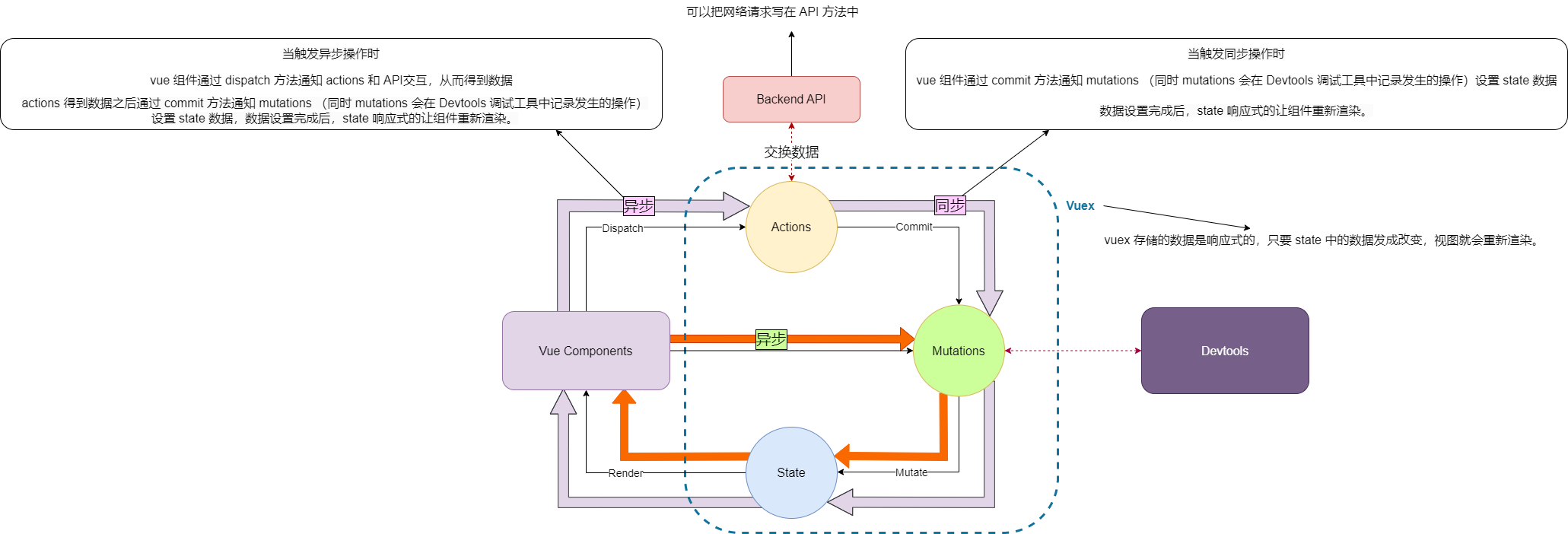
【1】Vuex图解
-
vuex 对象中通过 state 来存储状态
- 除了 state 以外还有用来操作 state 中数据的方法集
- 以及当我们需要对 state 中的数据需要加工的方法集等等成员。
-
成员列表:
-
state:存放状态(全局状态数据) 必填项
-
mutations:对于 state 成员进行同步修改操作(也可以支持异步操作)
-
getters:获取 state 中的数据,类似于组件中的计算属性
-
actions:进行异步操作,异步得到结果后通知 mutation 修改 state 成员
-
modules:模块化状态管理,多状态文件管理时使用,开发项目时多为多模块项目
-
-
在多模块 vuex 中会有配置namespaced
。
【2】Vuex执行流程
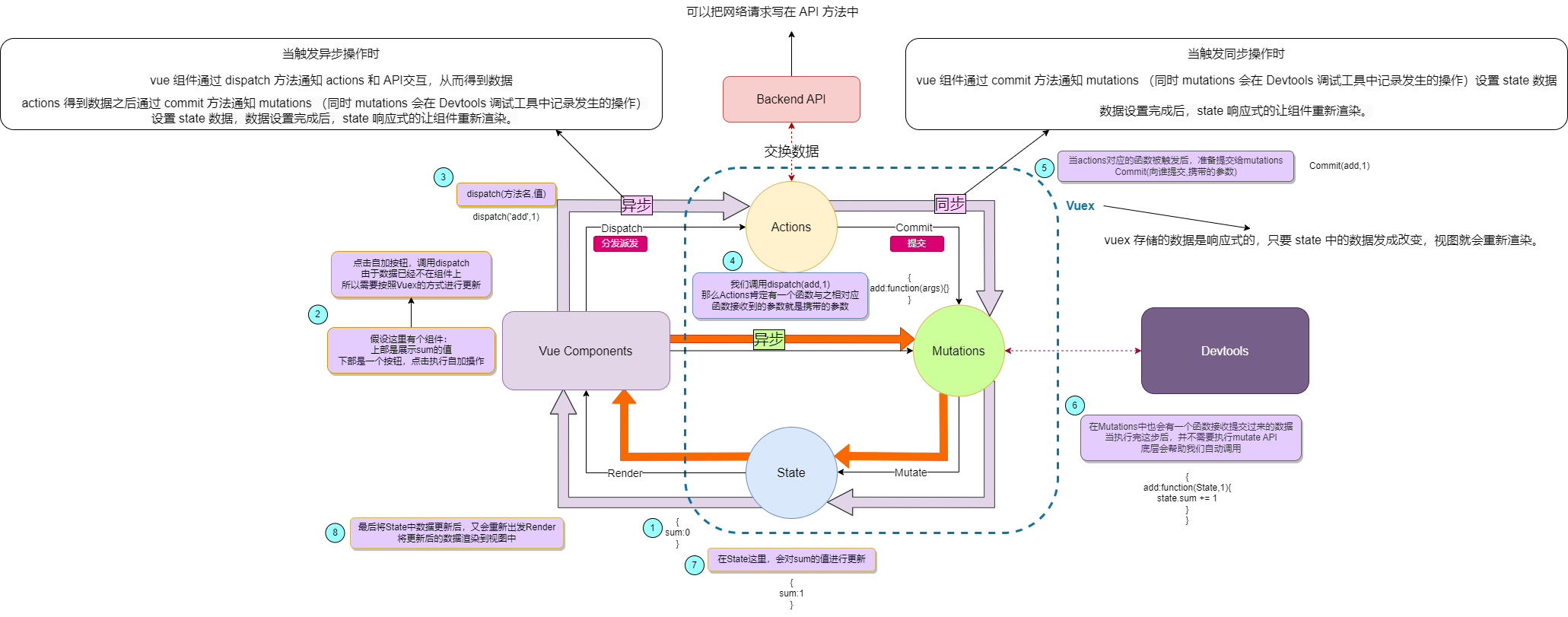
-
vue 组件会从 vuex 的 state 中获取数据,当组件修改数据时,会经过以下流程:
- 当触发同步操作时:
- vue 组件通过 commit 方法通知 mutations (同时 mutations 会在 Devtools 调试工具中记录发生的操作)设置 state 数据,数据设置完成后,state 响应式的让组件重新渲染。
注意:vuex 存储的数据是响应式的,只要 state 中的数据发成改变,视图就会重新渲染。
- 当触发同步操作时:
-
当触发异步操作时:
-
vue 组件通过 dispatch 方法通知 actions 和 API交互,从而得到数据,actions 得到数据之后通过 commit 方法通知 mutations (同时 mutations 会在 Devtools 调试工具中记录发生的操作)设置 state 数据,数据设置完成后,state 响应式的让组件重新渲染。
-
这里可以看出,在 vuex 中,我们可以把网络请求写在 API 方法中。
-
- 扩展:
- 早期 mutations 只允许同步操作,如果要进行异步操作需要按照上述流程
- 原因是早期的 Devtools 监听不到异步操作。
- 但是现在调试工具经过升级后,已经能够监听到异步操作了,
- 也就是说现在的 mutations 也支持异步操作
- 但是在方文档中还是只允许同步操作。
【三】基本使用(操作state的数据)
【顾客-服务员-厨师-上菜】
- 通过 dispatch 触发 actions 再调用 mutations 中的函数
rc\views\HomeView.vue
<template> <div class="home"> <h1>Vuex的使用</h1>
<h3>使用Vuex中的store内的 number</h3> 购物车商品数量:{{ this.$store.state.number }} <hr> <button @click="clickAdd">点我购物车 +1</button> </div></template>
<script>// @ is an alias to /src
export default { name: 'HomeView', components: {}, data() { return {} }, methods: { clickAdd() { // (1) 直接操作 // this.$store.state.number += 1 // (2) 经过Vuex,通过 dispatch 触发 actions // 'add' : 必须是 actions 中存在的函数 this.$store.dispatch('add', 1) } }}</script>src\store\index.js
import Vue from 'vue'import Vuex from 'vuex'
Vue.use(Vuex)
export default new Vuex.Store({ state: { number: 10 }, getters: {}, mutations: { // 至少要有参数 state : 上面 的 state 对象 Add(state, args) { state.number += args } }, actions: { // 至少要有参数 context : 上下文对象,触发 mutations中的函数执行,或者直接修改 state 中的数据 // args : 接收到的传入的参数 add(context, args) { // 使用 Commit 触发 mutations 中的函数 context.commit('Add', args) // 会触发 mutations 中的Add的执行 } }, modules: {}})【顾客-厨师-上菜】
- 直接操作 mutations 执行相应的函数
rc\views\HomeView.vue
<template> <div class="home"> <h1>Vuex的使用</h1>
<h3>使用Vuex中的store内的 number</h3> 购物车商品数量:{{ this.$store.state.number }} <hr> <button @click="clickAdd">点我购物车 +1</button> </div></template>
<script>// @ is an alias to /src
export default { name: 'HomeView', components: {}, data() { return {} }, methods: { clickAdd() { // (1) 直接操作 // this.$store.state.number += 1 // (2) 经过Vuex,通过 dispatch 触发 actions // 'add' : 必须是 actions 中存在的函数 // this.$store.dispatch('add', 1) // (3) 直接操作 mutations this.$store.commit('Add', 1) } }}</script>src\store\index.js
import Vue from 'vue'import Vuex from 'vuex'
Vue.use(Vuex)
export default new Vuex.Store({ state: { number: 10 }, getters: {}, mutations: { // 至少要有参数 state : 上面 的 state 对象 Add(state, args) { state.number += args } }, actions: { // 至少要有参数 context : 上下文对象,触发 mutations中的函数执行,或者直接修改 state 中的数据 // args : 接收到的传入的参数 add(context, args) { // 使用 Commit 触发 mutations 中的函数 context.commit('Add', args) // 会触发 mutations 中的Add的执行 } }, modules: {}})【四】基本使用(组件间通信)
src\components\ShoppingCar.vue- 局部组件
<script setup>
</script>
<template> <div> <h4>购物车商品数量</h4> {{ this.$store.state.goods }} </div></template>
<style scoped>
</style>src\views\HomeView.vue
<template> <div class="home"> <h1>Vuex的使用</h1>
<h3>使用Vuex中的store内的 number</h3> 购物车商品数量:{{ this.$store.state.number }} <hr> <button @click="clickAdd">点我购物车 +1</button>
<h3>使用Vuex组件间通信</h3>
<ul> <li>智力 <button @click="add('智力')">+</button> </li> <li>力量 <button @click="add('力量')">+</button> </li> </ul> <br> <ShoppingCar></ShoppingCar>
</div></template>
<script>import ShoppingCar from "@/components/ShoppingCar.vue";// @ is an alias to /src
export default { name: 'HomeView', components: { ShoppingCar, }, data() { return {} }, methods: { clickAdd() { // (1) 直接操作 // this.$store.state.number += 1 // (2) 经过Vuex,通过 dispatch 触发 actions // 'add' : 必须是 actions 中存在的函数 // this.$store.dispatch('add', 1) // (3) 直接操作 mutations this.$store.commit('Add', 1) }, add(args) { // 直接操作 mutations // this.$store.state.goods.push(args) // 经过Vuex,通过 dispatch 触发 actions this.$store.dispatch('AddGoods', args) } }}</script>src\store\index.js
import Vue from 'vue'import Vuex from 'vuex'
Vue.use(Vuex)
export default new Vuex.Store({ state: { number: 10, goods: [] }, getters: {}, mutations: { // 至少要有参数 state : 上面 的 state 对象 Add(state, args) { state.number += args }, AddGoods(state, args) { state.goods.push(args) } }, actions: { // 至少要有参数 context : 上下文对象,触发 mutations中的函数执行,或者直接修改 state 中的数据 // args : 接收到的传入的参数 add(context, args) { // 使用 Commit 触发 mutations 中的函数 context.commit('Add', args) // 会触发 mutations 中的Add的执行 }, AddGoods(context, args) { // 可以在这里发送 Ajax请求,检查内存是否足够 context.commit('AddGoods', args) // 会触发 mutations 中的Add的执行 // 假设库存不够,不能将数据进行更改 // alert('库存不足') // return } }, modules: {}})【】Vuex案例
- 假设我们有一个购物车应用,有以下几个组件:
ProductList(商品列表)Cart(购物车)CartItem(购物车中的商品项)。
- 首先
- 在安装了Vue和Vuex之后
- 在Vue根实例中调用
Vue.use(Vuex)以启用Vuex插件。
- 在Vue根实例中调用
- 在安装了Vue和Vuex之后
- 然后
- 我们创建一个
store对象来存储我们的共享状态。 - 在该对象中,我们定义了一个
state属性来存储购物车中的商品列表,以及一些操作(如添加商品到购物车、从购物车删除商品等)来修改该状态。
- 我们创建一个
import Vue from 'vue';import Vuex from 'vuex';import App from './App';// 导入其他模块的store,如果有import store from './store';
Vue.use(Vuex);
new Vue({ el: '#app', store, // 使用store render: h => h(App)});import Vue from 'vue';import Vuex from 'vuex';
Vue.use(Vuex);
const store = new Vuex.Store({ state: { cartItems: [] // 购物车商品列表 }, mutations: { addToCart(state, product) { state.cartItems.push(product); }, removeFromCart(state, product) { const index = state.cartItems.indexOf(product); if (index !== -1) { state.cartItems.splice(index, 1); } } }, actions: { addToCart({ commit }, product) { commit('addToCart', product); }, removeFromCart({ commit }, product) { commit('removeFromCart', product); } }, getters: { cartItemCount(state) { return state.cartItems.length; } }});
export default store;- 在上述代码中
- 我们定义了一个名为
cartItems的状态,在mutations中定义了两个操作来修改该状态:addToCart用于添加商品到购物车,removeFromCart用于从购物车中删除商品。actions则是包装了对应的mutations操作,可以进行异步操作或触发其他mutations操作。getters用于计算衍生的状态,例如计算购物车中商品的数量。
- 我们定义了一个名为
- 现在
- 我们可以在任何组件中使用
this.$store来访问store对象,以读取或修改状态。 - 例如,在
ProductList组件中点击”Add to Cart”按钮时,可以通过调用this.$store.dispatch('addToCart', product)来将商品添加到购物车。
- 我们可以在任何组件中使用
- 在
Cart组件中- 可以使用
this.$store.state.cartItems来获取购物车商品列表,并在CartItem组件中通过遍历该列表渲染每个商品项。
- 可以使用
- 这样,我们就实现了组件间共享状态的集中管理,并且避免了繁琐的props传递和事件监听。
【】
支持与分享
如果这篇文章对你有帮助,欢迎分享给更多人或打赏支持!
相关文章智能推荐
1
Firefly 接入站点日历页面
Web 开发为 Firefly 增加独立站点日历,汇总节日、纪念日、安排和文章发布日期,并记录配置、交互与侧栏时间进度卡片的实现。
2
Firefly 博客接入 Waline 评论系统
Web 开发对比 Firefly 内置评论方案,记录使用 Vercel 与 Neon 部署 Waline、绑定域名、注册管理员及接入博客的完整流程。
3
NAS 与 Syncthing 多端笔记同步
运维与系统管理使用 Syncthing 在 NAS、Mac 与 Windows 之间同步 Typora 笔记和图片,记录 Docker Compose 部署、设备配对、NetsGo 外网转发,以及版本保留、权限和带宽排查。
4
Nexus Terminal 学习笔记:Web 远程连接与部署运维
运维与系统管理记录 Nexus Terminal 的 Docker Compose 部署、HTTPS 与 WebSocket 反向代理,以及 SSH、SFTP、RDP、VNC 连接管理,整理登录保护、会话挂起、备份升级和常见排障方法。
5
C 语言发展史
编程语言了解 C 语言从 BCPL、B 语言到现代标准 C 的发展历程、核心特点与应用领域。
随机文章随机推荐
评论区

Dream
Hello, I'm Dream.
欢迎来到我的博客!爱学习爱进步。
文章
367
分类
6
标签
201
总字数
804,820
运行时长
0 天
最后活动
0 天前
站点域名firefly.cuteleaf.cn
Fireflyv6.16.8
Astrov7.3.2
Nodev24.21.0
pnpmv11.22.0
构建时间2026年10月17日 21:20:42
系统信息Linux / x86_64