


Firefly 接入站点日历页面
- 1Firefly 博客接入 Waline 评论系统
- 2Firefly 接入站点日历页面本文

【一】目标
为 Firefly 增加独立的 /calendar/ 页面,用一个月历汇总四类信息:法定/传统节日、生日或纪念日、个人安排、文章发布日期。
页面保持全宽,不使用左右 Widget 侧栏;导航入口放在“我的 → 站点日历”。原有右侧栏 Calendar Widget 不删除,仍可作为轻量的文章发布日历使用。
【二】实现结构
| 文件 | 作用 |
|---|---|
src/config/calendarConfig.ts | 日常维护的日历数据:节日、生日、计划、节假日 API 年份 |
src/types/calendarConfig.ts | 日历配置的 TypeScript 类型 |
src/utils/calendar-utils.ts | 构建期合并农历、节假日 API、计划与文章数据 |
src/pages/calendar.astro | /calendar/ 页面与客户端月份切换、当日事件交互 |
src/styles/pages/calendar.css | 事件颜色、格子和移动端样式 |
农历计算使用 lunar-typescript。它在构建阶段把农历日期转换为对应公历日期,浏览器无需再加载额外日历库。
【三】页面开关和导航
【1】新增日历页
(1)添加日历页面
- 在
src\pages添加日历页面
---import { Icon } from "astro-icon/components";import materialSymbols from "@iconify-json/material-symbols/icons.json";import { getIconData, iconToSVG } from "@iconify/utils";import Navbar from "@/components/layout/Navbar.astro";import { calendarConfig, siteConfig } from "@/config";import Layout from "@/layouts/Layout.astro";import "@/styles/pages/calendar.css";import { getCalendarDays } from "@/utils/calendar-utils";
if (!siteConfig.pages.calendar) { return Astro.redirect("/404/");}
const title = calendarConfig.title || "站点日历";const description = calendarConfig.description || "节日、纪念日、计划与文章发布记录";const calendarDays = await getCalendarDays();const overview = calendarConfig.overview ?? { futureDays: 30, maxItems: 6 };
// 月历事件由客户端切换月份后生成。这里仅序列化实际用到的 SVG,既能支持任意// Material Symbols 图标名,也不会把整套图标库发送到浏览器。const calendarIconSvgs = Object.fromEntries( [ ...new Set( calendarDays.flatMap((day) => day.events.map((event) => event.icon)), ), ] .filter((icon) => icon.startsWith("material-symbols:")) .flatMap((icon) => { const iconData = getIconData( materialSymbols, icon.slice("material-symbols:".length), ); if (!iconData) return []; const rendered = iconToSVG(iconData); return [ [ icon, { body: rendered.body, viewBox: rendered.attributes.viewBox ?? "0 0 24 24", }, ], ]; }),);---
<Layout title={title} description={description}> <Navbar /> <main class="calendar-page max-w-(--page-width) mx-auto px-4 pt-6 pb-12 md:pt-10"> <header class="card-base calendar-hero px-6 py-7 mb-5 md:px-9 md:py-8"> <div class="flex items-start gap-4"> <div class="shrink-0 rounded-2xl p-3 bg-(--btn-regular-bg) text-(--primary)"> <Icon name="material-symbols:calendar-month" class="text-3xl" /> </div> <div> <h1 class="text-2xl font-bold text-90 md:text-3xl">{title}</h1> <p class="mt-2 text-50">{description}</p> </div> </div> </header>
<div class="calendar-layout grid gap-5 xl:grid-cols-[minmax(15rem,.8fr)_minmax(30rem,1.8fr)_minmax(16rem,.9fr)]"> <section class="card-base calendar-panel calendar-upcoming-panel p-5" aria-labelledby="calendar-upcoming-title"> <div class="flex items-center gap-2 mb-4"> <Icon name="material-symbols:upcoming-outline" class="text-xl text-(--primary)" /> <h2 id="calendar-upcoming-title" class="font-bold text-lg">近期事件</h2> </div> <div id="calendar-upcoming" class="space-y-3"></div> </section>
<section class="card-base calendar-panel calendar-main-panel p-4 md:p-6" aria-label="月历"> <div class="calendar-toolbar flex items-center justify-between gap-3 mb-5"> <button id="calendar-prev" type="button" class="btn-plain rounded-lg w-10 h-10" aria-label="上个月"><Icon name="fa7-solid:chevron-left" /></button> <button id="calendar-month-title" type="button" class="btn-plain px-3 py-2 rounded-lg font-bold text-lg" aria-label="回到本月"></button> <div class="flex items-center gap-1"> <button id="calendar-today" type="button" class="calendar-today-btn" aria-label="回到今日"><Icon name="material-symbols:today-outline" /> <span>今日</span></button> <button id="calendar-next" type="button" class="btn-plain rounded-lg w-10 h-10" aria-label="下个月"><Icon name="fa7-solid:chevron-right" /></button> </div> </div> <div class="calendar-grid grid gap-px rounded-xl overflow-hidden bg-(--line-divider)" role="grid" aria-label="日历"> {["日", "一", "二", "三", "四", "五", "六"].map((day) => <div class="bg-(--card-bg) py-2 text-center text-xs text-50 font-medium">{day}</div>)} </div> <div id="calendar-grid" class="calendar-grid grid gap-px rounded-b-xl overflow-hidden bg-(--line-divider)"></div> <div class="mt-5 flex flex-wrap gap-x-4 gap-y-2 text-xs text-50" aria-label="事件图例"> {[["holiday", "节日"], ["birthday", "生日 / 纪念日"], ["schedule", "计划"], ["post", "文章"]].map(([type, label]) => <span class="inline-flex items-center gap-1.5"><i class="calendar-event-dot" data-type={type}></i>{label}</span>)} </div> </section>
<section class="card-base calendar-panel calendar-detail-panel p-5" aria-labelledby="calendar-detail-title"> <div class="flex items-center gap-2 mb-4"> <Icon name="material-symbols:event-note-outline" class="text-xl text-(--primary)" /> <h2 id="calendar-detail-title" class="font-bold text-lg">当日事件</h2> </div> <div id="calendar-detail" class="calendar-detail-list text-sm"></div> </section> </div> </main>
<script is:inline define:vars={{ calendarDays, calendarIconSvgs, overview }}> const dayMap = new Map(calendarDays.map((day) => [day.date, day])); const dateFormat = new Intl.DateTimeFormat("zh-CN", { year: "numeric", month: "long", day: "numeric", weekday: "long" }); const iconMap = { "material-symbols:festival": "🎉", "material-symbols:cake": "🎂", "material-symbols:event": "📌", "material-symbols:article": "📝", "material-symbols:celebration": "🎊", "material-symbols:flag": "🚩", "material-symbols:rocket-launch": "🚀", "material-symbols:notifications": "🔔", }; let shownDate = new Date(); shownDate = new Date(shownDate.getFullYear(), shownDate.getMonth(), 1, 12); let selectedDate = toKey(new Date());
function toKey(date) { return [date.getFullYear(), String(date.getMonth() + 1).padStart(2, "0"), String(date.getDate()).padStart(2, "0")].join("-"); } function fromKey(key) { return new Date(`${key}T12:00:00`); } function escapeHtml(value) { const node = document.createElement("span"); node.textContent = String(value); return node.innerHTML; } function eventIcon(event) { const icon = calendarIconSvgs[event.icon]; return icon ? `<svg class="calendar-config-icon" viewBox="${icon.viewBox}" aria-hidden="true">${icon.body}</svg>` : iconMap[event.icon] || iconMap[`material-symbols:${event.type}`] || "•"; } function uniqueEvents(events) { const seen = new Set(); return events.filter((event) => { const key = `${event.type}:${event.name}`; if (seen.has(key)) return false; seen.add(key); return true; }); } function eventHtml(event) { const content = `<span class="calendar-event-icon" data-type="${event.type}" aria-hidden="true">${eventIcon(event)}</span><span class="min-w-0 flex-1"><span class="block font-medium truncate">${escapeHtml(event.name)}</span>${event.note ? `<span class="block mt-0.5 text-xs text-50">${escapeHtml(event.note)}</span>` : ""}<span class="calendar-event-kind" data-type="${event.type}">${event.type === "holiday" ? "节日" : event.type === "birthday" ? "纪念日" : event.type === "schedule" ? "计划" : "文章"}</span></span>`; return event.href ? `<a href="${escapeHtml(event.href)}" class="calendar-detail-item">${content}</a>` : `<div class="calendar-detail-item">${content}</div>`; } function countdownText(name, date) { const remaining = new Date(`${date}T00:00:00`).getTime() - Date.now(); if (remaining <= 0) return `${name}就在今天`; const minutes = Math.floor(remaining / 60000); const days = Math.floor(minutes / 1440); const hours = Math.floor((minutes % 1440) / 60); const restMinutes = minutes % 60; return `距离 ${name} 还有:${days ? `${days} 天 ` : ""}${hours} 时 ${restMinutes} 分`; } function renderDetail() { const target = document.getElementById("calendar-detail"); const day = dayMap.get(selectedDate); const label = document.querySelector("#calendar-detail-title"); if (label) label.textContent = `${dateFormat.format(fromKey(selectedDate))} ${day?.lunar ? `· 农历${day.lunar}` : ""}`; target.innerHTML = day?.events?.length ? uniqueEvents(day.events).map(eventHtml).join("") : '<div class="calendar-empty"><span>○</span><p>当天没有事件</p></div>'; } function renderUpcoming() { const target = document.getElementById("calendar-upcoming"); const today = toKey(new Date()); const future = calendarDays // 左栏按类型展示「下一次」事件,不能用 30 天窗口截掉跨年的生日/纪念日。 .filter((day) => day.date >= today) .flatMap((day) => day.events.map((event) => ({ ...event, lunar: day.lunar }))); const monthKey = today.slice(0, 7); // 左栏是固定三块:节日只取本月最近一条,不能让法定假期的多日记录填满区域。 const holiday = uniqueEvents(future.filter((item) => item.type === "holiday" && item.date.startsWith(monthKey)))[0]; const anniversaries = uniqueEvents(future.filter((item) => item.type === "birthday")).slice(0, overview.maxItems || 6); const schedules = uniqueEvents(future.filter((item) => item.type === "schedule")).slice(0, overview.maxItems || 6); function cards(events, type) { return events.map((event) => `<button type="button" data-date="${event.date}" class="calendar-upcoming-card"><span class="calendar-event-icon" data-type="${event.type}">${eventIcon(event)}</span><span class="min-w-0"><small class="calendar-upcoming-kind">${type}</small><strong>${escapeHtml(event.name)}</strong><small class="calendar-upcoming-countdown" data-countdown-date="${event.date}" data-countdown-name="${escapeHtml(event.name)}">${countdownText(event.name, event.date)}</small></span></button>`).join(""); } const section = (type, label, events, kind, empty) => `<section class="calendar-upcoming-item" data-type="${type}"><div class="calendar-upcoming-label">${label}</div><div class="calendar-upcoming-cards">${events.length ? cards(events, kind) : `<p class="calendar-upcoming-empty">${empty}</p>`}</div></section>`; target.innerHTML = [ section("holiday", "最近的节日", holiday ? [holiday] : [], "节日", "本月暂无节日"), section("birthday", "最近的纪念日", anniversaries, "纪念日", "暂未配置纪念日"), section("schedule", "最近的安排", schedules, "安排", "这一天没有日程"), ].join(""); target.querySelectorAll("[data-date]").forEach((button) => button.addEventListener("click", () => { selectedDate = button.dataset.date; shownDate = new Date(`${selectedDate}T12:00:00`); shownDate.setDate(1); renderCalendar(); renderDetail(); })); const updateCountdowns = () => target.querySelectorAll("[data-countdown-date]").forEach((node) => { node.textContent = countdownText(node.dataset.countdownName, node.dataset.countdownDate); }); window.setInterval(updateCountdowns, 60_000); } function renderCalendar() { const grid = document.getElementById("calendar-grid"); const title = document.getElementById("calendar-month-title"); const year = shownDate.getFullYear(); const month = shownDate.getMonth(); title.textContent = `${year} 年 ${month + 1} 月`; const firstWeekday = new Date(year, month, 1).getDay(); const dayCount = new Date(year, month + 1, 0).getDate(); const previousCount = new Date(year, month, 0).getDate(); const cells = Array.from({ length: Math.ceil((firstWeekday + dayCount) / 7) * 7 }, (_, index) => { const offset = index - firstWeekday + 1; const date = new Date(year, month, offset, 12); const key = toKey(date); const item = dayMap.get(key); const current = date.getMonth() === month; const today = key === toKey(new Date()); const events = uniqueEvents(item?.events || []); const previews = events.slice(0, 2).map((event) => `<span class="calendar-day-event" data-type="${event.type}" title="${escapeHtml(event.name)}">${escapeHtml(event.name)}</span>`).join(""); const extra = events.length > 2 ? `<span class="calendar-day-more">+${events.length - 2}</span>` : ""; return `<button type="button" data-date="${key}" data-current="${current}" data-selected="${key === selectedDate}" data-today="${today}" class="calendar-day bg-(--card-bg) p-2 text-left"><span class="calendar-day-head"><span class="calendar-day-number">${date.getDate()}</span>${item?.lunar ? `<span class="calendar-lunar">${item.lunar}</span>` : ""}</span><span class="calendar-day-events">${previews}${extra}</span></button>`; }); grid.innerHTML = cells.join(""); grid.querySelectorAll("[data-date]").forEach((button) => button.addEventListener("click", () => { selectedDate = button.dataset.date; renderCalendar(); renderDetail(); })); } document.getElementById("calendar-prev").addEventListener("click", () => { shownDate = new Date(shownDate.getFullYear(), shownDate.getMonth() - 1, 1, 12); renderCalendar(); }); document.getElementById("calendar-next").addEventListener("click", () => { shownDate = new Date(shownDate.getFullYear(), shownDate.getMonth() + 1, 1, 12); renderCalendar(); }); function returnToToday() { shownDate = new Date(); shownDate = new Date(shownDate.getFullYear(), shownDate.getMonth(), 1, 12); selectedDate = toKey(new Date()); renderCalendar(); renderDetail(); } document.getElementById("calendar-month-title").addEventListener("click", returnToToday); document.getElementById("calendar-today").addEventListener("click", returnToToday); renderUpcoming(); renderCalendar(); renderDetail(); </script></Layout>(2)添加日历页面样式
- 在
src\styles\pages添加日历页面样式的css代码
.calendar-page { --cal-holiday: oklch(0.64 0.15 38); --cal-birthday: oklch(0.67 0.14 345); --cal-schedule: var(--primary); --cal-post: oklch(0.48 0.05 var(--hue)); }.calendar-page button { font: inherit; }.calendar-hero { position: relative; overflow: hidden; }.calendar-hero::after { content: ""; position: absolute; width: 18rem; height: 18rem; right: -7rem; top: -12rem; border-radius: 999px; background: color-mix(in srgb, var(--primary) 10%, transparent); filter: blur(8px); pointer-events: none; }.calendar-panel { min-width: 0; }.calendar-upcoming-panel,.calendar-detail-panel { align-self: start; }.calendar-toolbar { border-bottom: 1px solid var(--line-divider); padding-bottom: 1rem; }.calendar-today-btn { display: inline-flex; align-items: center; gap: .35rem; min-height: 2.3rem; padding: 0 .7rem; border: 1px solid color-mix(in srgb, var(--primary) 45%, var(--line-divider)); border-radius: .55rem; color: var(--primary); background: color-mix(in srgb, var(--primary) 8%, transparent); font-size: .82rem; font-weight: 650; transition: background .15s ease, transform .15s ease; }.calendar-today-btn:hover { background: color-mix(in srgb, var(--primary) 16%, transparent); transform: translateY(-1px); }.calendar-grid { grid-template-columns: repeat(7, minmax(0, 1fr)); }.calendar-day { min-height: 7.25rem; padding: .65rem; color: inherit; transition: background .15s ease, box-shadow .15s ease, opacity .15s ease; }.calendar-day:hover { background: color-mix(in srgb, var(--primary) 7%, var(--card-bg)); }.calendar-day:focus-visible { outline: 2px solid var(--primary); outline-offset: -2px; z-index: 1; }.calendar-day[data-current="false"] { opacity: .34; }.calendar-day[data-selected="true"] { position: relative; z-index: 1; box-shadow: inset 0 0 0 2px var(--primary); background: color-mix(in srgb, var(--primary) 7%, var(--card-bg)); }.calendar-day-head { display: flex; justify-content: space-between; align-items: center; gap: .25rem; }.calendar-day-number { display: inline-flex; width: 1.8rem; height: 1.8rem; align-items: center; justify-content: center; border-radius: 999px; font-size: .9rem; font-weight: 700; }.calendar-day[data-today="true"] .calendar-day-number { background: var(--primary); color: white; box-shadow: 0 3px 10px color-mix(in srgb, var(--primary) 35%, transparent); }.calendar-lunar { font-size: .69rem; color: color-mix(in srgb, currentColor 48%, transparent); white-space: nowrap; }.calendar-day-events { display: grid; gap: .18rem; margin-top: .55rem; overflow: hidden; }.calendar-day-event { display: block; overflow: hidden; padding: .12rem .28rem; border-left: 2px solid var(--cal-post); border-radius: .15rem; background: color-mix(in srgb, var(--cal-post) 9%, transparent); color: color-mix(in srgb, currentColor 78%, transparent); font-size: .68rem; line-height: 1.25; text-overflow: ellipsis; white-space: nowrap; }.calendar-day-event[data-type="holiday"] { border-color: var(--cal-holiday); background: color-mix(in srgb, var(--cal-holiday) 10%, transparent); }.calendar-day-event[data-type="birthday"] { border-color: var(--cal-birthday); background: color-mix(in srgb, var(--cal-birthday) 10%, transparent); }.calendar-day-event[data-type="schedule"] { border-color: var(--cal-schedule); background: color-mix(in srgb, var(--cal-schedule) 10%, transparent); }.calendar-day-more { color: var(--primary); font-size: .67rem; font-weight: 700; }.calendar-event-dot { width: .4rem; height: .4rem; border-radius: 999px; background: var(--cal-post); }.calendar-event-dot[data-type="holiday"],.calendar-event-badge[data-type="holiday"] { background: var(--cal-holiday); }.calendar-event-dot[data-type="birthday"],.calendar-event-badge[data-type="birthday"] { background: var(--cal-birthday); }.calendar-event-dot[data-type="schedule"],.calendar-event-badge[data-type="schedule"] { background: var(--cal-schedule); }.calendar-event-dot[data-type="post"],.calendar-event-badge[data-type="post"] { background: var(--cal-post); }.calendar-upcoming-item { padding: 0 0 1rem .85rem; border-left: 2px solid var(--cal-post); }.calendar-upcoming-item[data-type="holiday"] { border-color: var(--cal-holiday); }.calendar-upcoming-item[data-type="birthday"] { border-color: var(--cal-birthday); }.calendar-upcoming-item[data-type="schedule"] { border-color: var(--cal-schedule); }.calendar-upcoming-label { margin-bottom: .55rem; color: color-mix(in srgb, currentColor 55%, transparent); font-size: .72rem; font-weight: 650; }.calendar-upcoming-cards { display: grid; gap: .55rem; }.calendar-upcoming-card { display: flex; width: 100%; align-items: center; gap: .7rem; padding: .75rem; border: 1px solid color-mix(in srgb, var(--line-divider) 86%, var(--primary)); border-radius: 1rem; color: inherit; text-align: left; background: color-mix(in srgb, var(--primary) 3%, transparent); transition: border-color .15s ease, transform .15s ease, background .15s ease; }.calendar-upcoming-card:hover { border-color: color-mix(in srgb, var(--primary) 60%, var(--line-divider)); background: color-mix(in srgb, var(--primary) 8%, transparent); transform: translateY(-1px); }.calendar-upcoming-card strong,.calendar-upcoming-card small { display: block; }.calendar-upcoming-card strong { margin-top: .12rem; }.calendar-upcoming-card small { margin-top: .2rem; color: color-mix(in srgb, currentColor 52%, transparent); font-size: .7rem; }.calendar-upcoming-card .calendar-upcoming-kind { margin: 0; color: color-mix(in srgb, currentColor 64%, transparent); font-size: .67rem; font-weight: 650; }.calendar-upcoming-card .calendar-upcoming-countdown { line-height: 1.45; }.calendar-upcoming-empty { margin: .15rem 0 0; color: color-mix(in srgb, currentColor 52%, transparent); font-size: .78rem; line-height: 1.5; }.calendar-event-icon { display: inline-flex; width: 2rem; height: 2rem; flex: none; align-items: center; justify-content: center; border-radius: .65rem; background: color-mix(in srgb, var(--cal-post) 13%, transparent); font-size: 1rem; }.calendar-event-icon[data-type="holiday"] { background: color-mix(in srgb, var(--cal-holiday) 15%, transparent); }.calendar-event-icon[data-type="birthday"] { background: color-mix(in srgb, var(--cal-birthday) 15%, transparent); }.calendar-event-icon[data-type="schedule"] { background: color-mix(in srgb, var(--cal-schedule) 15%, transparent); }.calendar-config-icon { width: 1.05rem; height: 1.05rem; fill: currentColor; }.calendar-detail-list { display: grid; gap: .6rem; max-height: 34rem; overflow: auto; padding-right: .15rem; }.calendar-detail-item { display: flex; align-items: center; gap: .7rem; padding: .75rem; border: 1px solid var(--line-divider); border-radius: .85rem; color: inherit; text-decoration: none; background: color-mix(in srgb, var(--primary) 3%, transparent); transition: transform .15s ease, border-color .15s ease, background .15s ease; }a.calendar-detail-item:hover { transform: translateY(-1px); border-color: color-mix(in srgb, var(--primary) 55%, var(--line-divider)); background: color-mix(in srgb, var(--primary) 8%, transparent); }.calendar-event-kind { display: inline-flex; margin-top: .35rem; padding: .1rem .35rem; border-radius: .28rem; color: color-mix(in srgb, currentColor 64%, transparent); background: color-mix(in srgb, var(--cal-post) 12%, transparent); font-size: .65rem; }.calendar-event-kind[data-type="holiday"] { background: color-mix(in srgb, var(--cal-holiday) 13%, transparent); }.calendar-event-kind[data-type="birthday"] { background: color-mix(in srgb, var(--cal-birthday) 13%, transparent); }.calendar-event-kind[data-type="schedule"] { background: color-mix(in srgb, var(--cal-schedule) 13%, transparent); }.calendar-empty { display: grid; place-items: center; min-height: 12rem; color: color-mix(in srgb, currentColor 45%, transparent); text-align: center; }.calendar-empty span { color: var(--primary); font-size: 2rem; opacity: .45; }@media (max-width: 767px) { .calendar-page { padding-inline: .75rem; }.calendar-hero { margin-inline: .25rem; }.calendar-layout { gap: 1rem; }.calendar-day { min-height: 4.7rem; padding: .45rem; }.calendar-day-events { display: none; }.calendar-lunar { font-size: .62rem; }.calendar-today-btn span { display: none; }.calendar-detail-list { max-height: none; } }【2】新增日历工具
- 在
src\utils\calendar-utils.ts新增处理日志信息的工具
import { Lunar } from "lunar-typescript";import { calendarConfig } from "@/config/calendarConfig";import { getSortedPosts } from "@/utils/content-utils";
export type CalendarEventType = "holiday" | "birthday" | "schedule" | "post";
export type CalendarEvent = { id: string; date: string; name: string; type: CalendarEventType; icon: string; note?: string; href?: string;};
export type CalendarDay = { date: string; lunar: string; events: CalendarEvent[];};
const eventIcons: Record<CalendarEventType, string> = { holiday: "material-symbols:festival", birthday: "material-symbols:cake", schedule: "material-symbols:event", post: "material-symbols:article",};
function toDateKey(date: Date): string { return [ date.getFullYear(), String(date.getMonth() + 1).padStart(2, "0"), String(date.getDate()).padStart(2, "0"), ].join("-");}
function toLocalDate(dateKey: string): Date { return new Date(`${dateKey}T12:00:00`);}
function lunarLabel(date: Date): string { const lunar = Lunar.fromDate(date); return lunar.getDayInChinese() === "初一" ? `${lunar.getMonthInChinese()}月` : lunar.getDayInChinese();}
function matchesLunarDate(date: Date, month: number, day: number): boolean { const lunar = Lunar.fromDate(date); return Math.abs(lunar.getMonth()) === month && lunar.getDay() === day;}
function dateRange(years: number[]): Date[] { const dates: Date[] = []; for (const year of years) { for ( let date = new Date(year, 0, 1, 12); date.getFullYear() === year; date.setDate(date.getDate() + 1) ) { dates.push(new Date(date)); } } return dates;}
async function fetchPublicHolidays(year: number): Promise<CalendarEvent[]> { const api = calendarConfig.holidayApi; if (!api?.enable) return []; const url = api.url.includes("{year}") ? api.url.replace("{year}", String(year)) : `${api.url}${year}`; const response = await fetch(url, { signal: AbortSignal.timeout(8_000), }); if (!response.ok) throw new Error(`Holiday API returned ${response.status}`); const payload = (await response.json()) as | { holiday?: Record<string, { holiday?: boolean; name?: string }>; } | Array<{ date?: string; localName?: string; name?: string }>;
// Nager.Date:[{ date: "2027-10-01", localName: "国庆节", ... }]。 // 只记录节日当天;放假区间与调休仍由内置节日作为基础降级数据。 if (Array.isArray(payload)) { return payload .filter((holiday) => /^\d{4}-\d{2}-\d{2}$/.test(holiday.date ?? "")) .map((holiday) => ({ id: `api-${holiday.date}`, date: holiday.date as string, name: holiday.localName || holiday.name || "法定节假日", type: "holiday" as const, icon: eventIcons.holiday, })); }
// 保留 timor.tech 格式兼容,方便日后按需切换其他接口。 return Object.entries(payload.holiday ?? {}) .filter(([, value]) => value.holiday && value.name) .map(([date, value]) => { // timor.tech 的键是 MM-DD;统一补成年份,供月历按 YYYY-MM-DD 查询。 const dateKey = /^\d{2}-\d{2}$/.test(date) ? `${year}-${date}` : date; return { id: `api-${dateKey}`, date: dateKey, name: value.name ?? "法定节假日", type: "holiday" as const, icon: eventIcons.holiday, }; });}
/** 在构建期汇总所有日历事件;接口故障不会阻断构建。 */export async function getCalendarDays(): Promise<CalendarDay[]> { const configuredYears = calendarConfig.holidayApi?.years ?? []; const thisYear = new Date().getFullYear(); const years = [ ...new Set([...configuredYears, thisYear, thisYear + 1]), ].sort(); const dates = dateRange(years); const events: CalendarEvent[] = [];
for (const date of dates) { const dateKey = toDateKey(date); for (const holiday of calendarConfig.builtinHolidays) { const matches = holiday.date.type === "solar" ? date.getMonth() + 1 === holiday.date.month && date.getDate() === holiday.date.day : matchesLunarDate(date, holiday.date.month, holiday.date.day); if (matches) events.push({ id: `builtin-${holiday.name}-${dateKey}`, date: dateKey, name: holiday.name, type: "holiday", icon: holiday.icon ?? eventIcons.holiday, note: holiday.note, }); } for (const birthday of calendarConfig.birthdays) { const matches = birthday.date.type === "solar" ? date.getMonth() + 1 === birthday.date.month && date.getDate() === birthday.date.day : matchesLunarDate(date, birthday.date.month, birthday.date.day); if (matches) events.push({ id: `birthday-${birthday.name}-${dateKey}`, date: dateKey, name: birthday.name, type: "birthday", icon: birthday.icon ?? eventIcons.birthday, note: birthday.note, }); } for (const schedule of calendarConfig.schedules) { const recurring = schedule.recurring; const matches = schedule.date === dateKey || (recurring?.freq === "yearly" && (recurring.lunar ? matchesLunarDate(date, recurring.month, recurring.day) : date.getMonth() + 1 === recurring.month && date.getDate() === recurring.day)); if (matches) events.push({ id: `schedule-${schedule.title}-${dateKey}`, date: dateKey, name: schedule.title, type: "schedule", icon: schedule.icon ?? eventIcons.schedule, note: schedule.note, }); } }
if (calendarConfig.holidayApi?.enable) { for (const year of years) { try { events.push(...(await fetchPublicHolidays(year))); } catch (error) { if (!calendarConfig.holidayApi.fallbackOnError) throw error; console.warn( `[calendar] ${year} 年法定节假日获取失败,已使用内置节日。`, error, ); } } }
if (calendarConfig.show?.posts !== false) { for (const post of await getSortedPosts()) { const date = new Date(post.data.published); const dateKey = toDateKey(date); if (years.includes(date.getFullYear())) events.push({ id: `post-${post.id}`, date: dateKey, name: post.data.title, type: "post", icon: eventIcons.post, href: `/posts/${post.id}/`, }); } }
const dayMap = new Map<string, CalendarDay>( dates.map((date) => { const dateKey = toDateKey(date); return [ dateKey, { date: dateKey, lunar: calendarConfig.show?.lunarDate === false ? "" : lunarLabel(date), events: [], }, ]; }), ); for (const event of events) { if (!dayMap.has(event.date)) { dayMap.set(event.date, { date: event.date, lunar: calendarConfig.show?.lunarDate === false ? "" : lunarLabel(toLocalDate(event.date)), events: [], }); } dayMap.get(event.date)?.events.push(event); } return [...dayMap.values()].sort((a, b) => a.date.localeCompare(b.date));}【3】新增日历页面配置项
- 在
src\config\calendarConfig.ts新增日历页面配置项
import type { CalendarConfig } from "@/types/calendarConfig";
/** * 站点日历配置。日常只需要编辑此文件;日期均按站点时区解释。 */export const calendarConfig: CalendarConfig = { title: "站点日历", description: "节日、纪念日、计划与文章发布记录", holidayApi: { enable: true, // 使用 {year} 占位符;Nager.Date 无需 API Key,避免 timor.tech 的 429 限流。 url: "https://date.nager.at/api/v3/PublicHolidays/{year}/CN", fallbackOnError: true, years: [2026, 2027], }, builtinHolidays: [ { name: "元旦", date: { type: "solar", month: 1, day: 1 }, icon: "material-symbols:celebration", }, { name: "春节", date: { type: "lunar", month: 1, day: 1 }, icon: "material-symbols:festival", }, { name: "元宵节", date: { type: "lunar", month: 1, day: 15 }, icon: "material-symbols:festival", }, { name: "端午节", date: { type: "lunar", month: 5, day: 5 }, icon: "material-symbols:festival", }, { name: "中秋节", date: { type: "lunar", month: 8, day: 15 }, icon: "material-symbols:festival", }, { name: "国庆节", date: { type: "solar", month: 10, day: 1 }, icon: "material-symbols:flag", }, ], // https://icones.js.org/collection/material-symbols // 例如:{ name: "建站日", date: { type: "solar", month: 1, day: 1 }, icon: "material-symbols:rocket-launch" }, // 农历生日:{ name: "我的生日", date: { type: "lunar", month: 1, day: 8 }, icon: "material-symbols:cake" }(正月初八会按当年农历自动换算) birthdays: [ { name: "建站日", date: { type: "solar", month: 9, day: 26 }, icon: "material-symbols:rocket-launch", }, { name: "我的生日", date: { type: "lunar", month: 1, day: 8 }, icon: "material-symbols:cake-rounded", }, ], // 一次性计划:{ title: "发布新文章", date: "2026-10-01", icon: "material-symbols:event" } // 每年重复:{ title: "续费提醒", recurring: { freq: "yearly", month: 6, day: 1 }, icon: "material-symbols:notifications" } schedules: [], show: { posts: true, lunarDate: true }, overview: { futureDays: 30, maxItems: 6 },};【4】添加日历页类型声明
- 在
src\types\calendarConfig.ts新增日历页类型声明
export type CalendarDate = { type: "solar" | "lunar"; month: number; day: number;};
export type CalendarEventConfig = { name: string; date: CalendarDate; icon?: string; note?: string;};
export type CalendarScheduleConfig = { title: string; date?: string; recurring?: { freq: "yearly"; month: number; day: number; lunar?: boolean; }; icon?: string; note?: string;};
export type CalendarConfig = { title?: string; description?: string; holidayApi?: { enable: boolean; url: string; fallbackOnError: boolean; years: number[]; }; builtinHolidays: CalendarEventConfig[]; birthdays: CalendarEventConfig[]; schedules: CalendarScheduleConfig[]; show?: { posts?: boolean; lunarDate?: boolean; }; overview?: { futureDays?: number; maxItems?: number; };};【4】新增侧边栏时间组件
- 在
src\components\widget\YearProgress.astro新增侧边栏时间组件
---import { calendarConfig } from "@/config/calendarConfig";import { url } from "@/utils/url-utils";
interface Props { class?: string; style?: string;}
const { class: className, style } = Astro.props;const holidays = calendarConfig.builtinHolidays .filter((holiday) => holiday.date.type === "solar") .map((holiday) => ({ name: holiday.name, ...holiday.date }));---
<a href={url("/calendar/")} class:list={[ "year-progress-widget-shell", "card-base block pb-4 no-underline text-inherit outline-none", className, ]} style={style} aria-label="时间进度,进入站点日历"> <div id="year-progress-widget" class="year-progress-widget px-4 pt-4 text-sm"> <div class="year-progress-row"> <strong class="year-progress-percent">--%</strong> <div class="year-progress-content"> <span class="year-progress-label">本年还剩 -- 天</span> <span class="year-progress-bar" aria-hidden="true"><i class="year-progress-fill"></i></span> </div> </div> <div class="year-progress-row"> <strong class="month-progress-percent">--%</strong> <div class="year-progress-content"> <span class="month-progress-label">本月还剩 -- 天</span> <span class="month-progress-bar year-progress-bar" aria-hidden="true"><i class="year-progress-fill"></i></span> </div> </div> <div class="year-progress-row"> <strong class="week-progress-percent">--%</strong> <div class="year-progress-content"> <span class="week-progress-label">本周还剩 -- 天</span> <span class="week-progress-bar year-progress-bar" aria-hidden="true"><i class="year-progress-fill"></i></span> </div> </div> <div class="year-progress-holiday"> <span class="year-progress-holiday-label">距离最近节日</span> <strong class="year-progress-holiday-days">--</strong> <span class="year-progress-holiday-date">----</span> </div> </div></a>
<script is:inline data-swup-ignore-script define:vars={{ holidays }}> function setText(root, selector, value) { const element = root.querySelector(selector); if (element) element.textContent = value; }
function setProgress(root, selector, value) { const fill = root.querySelector(`${selector} .year-progress-fill`); if (fill) fill.style.width = `${Math.min(100, Math.max(0, value))}%`; }
function daysInYear(year) { return new Date(year, 1, 29).getMonth() === 1 ? 366 : 365; }
function getNearestSolarHoliday(today) { return holidays .map((holiday) => { let date = new Date(today.getFullYear(), holiday.month - 1, holiday.day); if (date < today) date = new Date( today.getFullYear() + 1, holiday.month - 1, holiday.day, ); return { ...holiday, date }; }) .sort((a, b) => a.date - b.date)[0]; }
function renderYearProgress() { document.querySelectorAll(".year-progress-widget").forEach((root) => { const today = new Date(); const midnight = new Date(today.getFullYear(), today.getMonth(), today.getDate()); const startOfYear = new Date(today.getFullYear(), 0, 1); const dayOfYear = Math.floor((midnight - startOfYear) / 86400000) + 1; const yearTotal = daysInYear(today.getFullYear()); const yearPercent = (dayOfYear / yearTotal) * 100; const monthTotal = new Date(today.getFullYear(), today.getMonth() + 1, 0).getDate(); const monthPercent = (today.getDate() / monthTotal) * 100; const weekday = (today.getDay() + 6) % 7 + 1; const weekPercent = (weekday / 7) * 100;
setText(root, ".year-progress-percent", `${yearPercent.toFixed(1)}%`); setText(root, ".year-progress-label", `本年还剩 ${yearTotal - dayOfYear} 天`); setProgress(root, ".year-progress-bar", yearPercent); setText(root, ".month-progress-percent", `${monthPercent.toFixed(1)}%`); setText(root, ".month-progress-label", `本月还剩 ${monthTotal - today.getDate()} 天`); setProgress(root, ".month-progress-bar", monthPercent); setText(root, ".week-progress-percent", `${weekPercent.toFixed(1)}%`); setText(root, ".week-progress-label", `本周还剩 ${7 - weekday} 天`); setProgress(root, ".week-progress-bar", weekPercent);
const holiday = getNearestSolarHoliday(midnight); if (!holiday) return; const days = Math.round((holiday.date - midnight) / 86400000); setText( root, ".year-progress-holiday-label", days === 0 ? `${holiday.name}就在今天` : `距离${holiday.name}`, ); setText(root, ".year-progress-holiday-days", days === 0 ? "今天" : `${days} 天`); setText( root, ".year-progress-holiday-date", [holiday.date.getFullYear(), String(holiday.date.getMonth() + 1).padStart(2, "0"), String(holiday.date.getDate()).padStart(2, "0")].join("-"), ); }); }
renderYearProgress(); document.addEventListener("swup:page:view", renderYearProgress);</script>
<style> .year-progress-widget-shell { display: block; border-radius: var(--radius-large); }
.year-progress-widget-shell:hover, .year-progress-widget-shell:focus-visible { transform: translateY(-3px); box-shadow: 0 14px 28px color-mix(in srgb, var(--primary) 16%, transparent); }
.year-progress-widget-shell { border: 1px solid color-mix(in srgb, var(--line-divider) 86%, transparent); box-shadow: 0 6px 22px rgb(15 23 42 / 7%); transition: transform 0.2s ease, box-shadow 0.2s ease; }
:global(.dark) .year-progress-widget-shell { box-shadow: 0 8px 26px rgb(0 0 0 / 18%); }
.year-progress-widget { display: grid; gap: 1.15rem; }
.year-progress-row { display: flex; align-items: center; gap: 0.8rem; }
.year-progress-row strong { width: 3.9rem; flex: none; color: var(--primary); font-size: 0.95rem; }
.year-progress-content { display: grid; gap: 0.45rem; min-width: 0; flex: 1; }
.year-progress-label { color: color-mix(in srgb, currentColor 68%, transparent); } .year-progress-bar { display: block; width: 100%; height: 0.6rem; overflow: hidden; border-radius: 999px; background: color-mix(in srgb, currentColor 16%, transparent); } .year-progress-fill { display: block; height: 100%; width: 0; border-radius: inherit; background: linear-gradient(90deg, color-mix(in srgb, var(--primary) 76%, white), var(--primary)); box-shadow: 0 0 10px color-mix(in srgb, var(--primary) 35%, transparent); transition: width 0.7s cubic-bezier(0.2, 0.8, 0.2, 1); } .year-progress-holiday { border-top: 1px solid var(--line-divider); padding-top: 1.1rem; text-align: center; display: grid; gap: 0.15rem; } .year-progress-holiday-label { color: color-mix(in srgb, currentColor 65%, transparent); } .year-progress-holiday-days { color: var(--primary); font-size: 2.5rem; line-height: 1; letter-spacing: -0.08em; } .year-progress-holiday-date { color: color-mix(in srgb, currentColor 50%, transparent); font-size: 0.75rem; }</style>【5】注册配置
(1)添加类型导出
- 在
src\config\index.ts添加类型导出
// 类型导出export type { CalendarConfig, CalendarDate, CalendarEventConfig, CalendarScheduleConfig,} from "../types/calendarConfig";export type { ... }(2)页面开关
在src\pages\llms.txt.ts新增全局路由
// 主要页面:首页 / 归档 / 关于始终包含;其余按 siteConfig.pages 开关过滤const KEY_PAGES: KeyPage[] = [ ... { labelKey: I18nKey.calendar, path: "/calendar/", pageKey: "calendar", }, ...]在 src/types/siteConfig.ts 的 pages 类型中加入:
// 页面开关配置pages: { ... calendar: boolean; // 新增:站点日历页面开关};在 src/config/siteConfig.ts 的 pages 配置中启用:
const pages = resolvePageToggles({ ... // 站点日历页面开关 calendar: true, ...});关闭后 /calendar/ 会跳转至 404;因导航使用 pageKey: "calendar",入口也会自动隐藏。
部署环境也可以通过 PUBLIC_PAGES_CALENDAR=false 临时关闭。
(3)添加子菜单
在 src/config/navBarConfig.ts 的“我的”子菜单加入 LinkPresets.Calendar:
const getDynamicNavBarConfig = (): NavBarConfig => { // 我的及其子菜单 links.push({ name: "我的", url: "#", icon: "material-symbols:person", children: [ ... // 站点日历 LinkPresets.Calendar, ... ],}); return {links} as NavBarConfig;};
export const LinkPresets: Record<string, NavBarLink> = { ... Calendar: { name: "站点日历", url: "/calendar/", icon: "material-symbols:calendar-month", pageKey: "calendar", } ...};(4)添加侧边栏菜单
在src\components\layout\SideBar.astro注册组件
import YearProgress from "@/components/widget/YearProgress.astro";// 组件映射表const componentMap = { ... yearProgress: YearProgress, ...};在 src/config/sidebarConfig.ts 的“右侧边栏组件配置列表“加入侧边栏配置:
// 右侧边栏组件配置列表rightComponents: [ ... { // 组件类型:日历组件 type: "calendar", // 是否启用该组件 enable: true, // 是否显示组件标题 showTitle: false, // 组件位置 position: "sticky", // 是否在文章详情页显示 showOnPostPage: false, // 组件专属配置 specificConfig: { calendar: { // 是否显示年度文章热力图 showHeatmap: true, }, }, }, { // 组件类型:时间进度卡片,整卡点击可进入站点日历 type: "yearProgress", enable: true, showTitle: false, position: "sticky", showOnPostPage: false, } ...],【四】配置节日、纪念日和安排
日常只编辑 src/config/calendarConfig.ts。
date.type 为 solar 时是公历,为 lunar 时是农历。
schedules.date 用于仅出现一次的 YYYY-MM-DD 安排;recurring 用于每年重复的公历或农历安排。
农历生日不需要填写年份,也不用每年手动更新阳历日期。
type: "lunar" 会在构建时按当年农历自动换算为对应的公历日期,因此月历和“最近的纪念日”倒计时会随年份变化自动更新。
icon 可填写 Material Symbols 的完整名称,例如 material-symbols:cake-rounded。日历会在构建时内联实际用到的 SVG,因此配置中的图标会按所选样式显示,不会退化为占位符;图标可在 https://icones.js.org/collection/material-symbols 查找。
【五】节假日 API 和降级
构建时会将 URL 中的 {year} 替换为实际年份,并请求 Nager.Date 的 https://date.nager.at/api/v3/PublicHolidays/{year}/CN。接口返回中国法定节日当天及中文 localName,日历会将其标记到月历上。years 应覆盖当前年和下一年,便于“近期事件”跨年显示。
Nager.Date 不需要 API Key,能避免原 timor.tech 接口的 429 限流;它只提供节日当天,不提供完整放假区间或调休工作日。接口不可用、超时或返回异常时,fallbackOnError: true 会记录警告并继续构建;builtinHolidays 中的传统节日和固定公历节日仍会显示。因此日历不会因为第三方接口失效而阻塞部署。
【六】文章发布日期
show.posts: true 时,构建期通过 getSortedPosts() 获取文章,并将发布日作为 post 类型事件加入日历。点击右侧“当日事件”中的文章可以直接进入文章页。
文章的日期沿用 Markdown 文件头里的 published。若需要某天显示发布记录,只需要新增文章并设置正确日期,不必再编辑日历配置。
【七】样式和图例
src/styles/pages/calendar.css 通过 CSS 变量区分事件颜色:
.calendar-page { --cal-holiday: oklch(0.62 0.14 35); --cal-birthday: oklch(0.64 0.12 350); --cal-schedule: var(--primary); --cal-post: oklch(0.48 0.05 var(--hue));}计划颜色跟随站点主题色;切换主题 hue 后无需单独改日历颜色。移动端隐藏格子内的小圆点,只保留日期、农历和点选后的当日事件面板,避免月历过于拥挤。
【八】页面交互与展示
- 月历格子在桌面端显示至多两条事件预览,剩余数量以
+n表示;移动端保留日期和农历,避免文字拥挤。
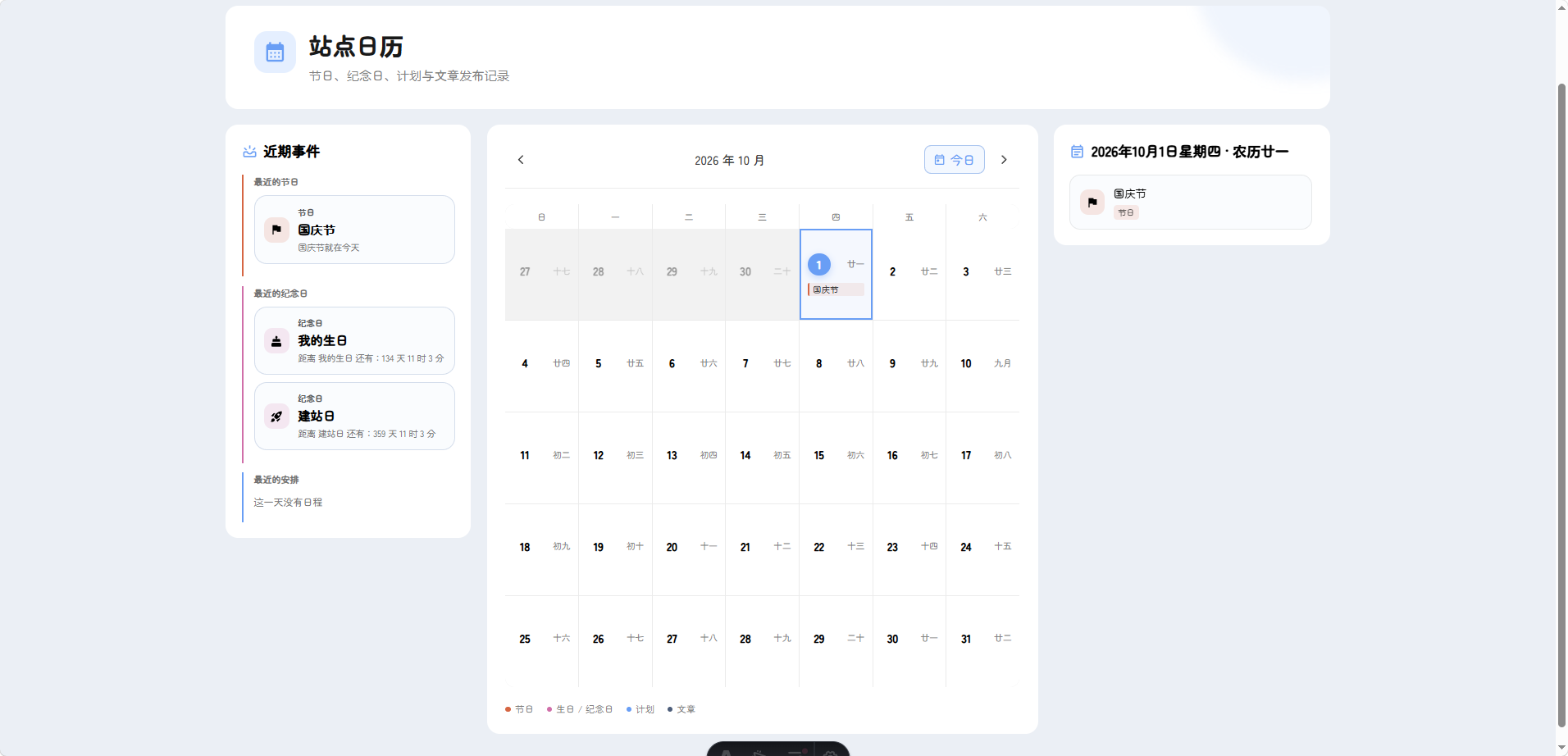
- 点击日期会更新右侧“当日事件”;文章条目可直接进入对应文章。
- 左右箭头切换月份,“今日”按钮和月份标题均可回到当前月并选中今天。
- 左栏固定为“最近的节日 / 最近的纪念日 / 最近的安排”三块,并以独立倒计时卡片展示;卡片只显示“距离某事件还有几天几时几分”,不显示年份或绝对日期。节日只展示当月最近的一项,避免法定假期的多日记录占满区域;纪念日和安排各展示后续已配置事件。安排为空时仍保留区块并提示“这一天没有日程”。跨年纪念日(例如 1 月 1 日的建站日)也会显示;点击卡片会跳转到该事件所在日期。
- 同一日期来自内置配置与法定节假日 API 的相同事件会在展示时去重,避免出现多条重复的国庆节。
- 右栏事件使用独立卡片并支持滚动,事件类别以节日、纪念日、计划、文章区分。
【九】右侧栏时间进度卡片
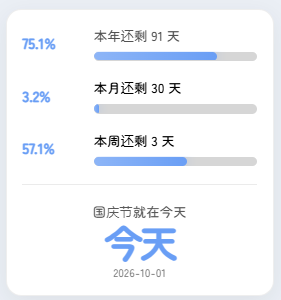
日历页之外,在右侧栏增加 YearProgress 小组件:显示本年、本月、本周进度条,以及下一个公历节日的倒计时。组件自身使用 --card-bg、圆角、边框和阴影形成独立卡片;整张卡片是链接,点击任意位置都会进入 /calendar/。
实现文件为 src/components/widget/YearProgress.astro。它在浏览器端计算进度,因此每天刷新页面即可更新,无需重新构建;最近节日读取 calendarConfig.builtinHolidays 中的公历节日。节日当天显示“国庆节就在今天 / 今天”,不会错误显示为“1 天”。
在 src/config/sidebarConfig.ts 的 rightComponents 中配置:
{ type: "yearProgress", enable: true, showTitle: false, position: "sticky", showOnPostPage: false,}将 enable 改为 false 可隐藏组件。它目前仅在非文章页显示,和右侧栏 Calendar Widget 并排使用;如需在文章页显示,将 showOnPostPage 改为 true。
【十】验证
开发时运行:
pnpm dev检查 /calendar/ 是否能切换月份、回到本月、显示农历、点击日期切换右侧事件;再检查“我的”菜单入口。
提交前运行:
pnpm checkpnpm type-checkpnpm buildpnpm build 的日志出现节假日 API 失败警告时,如果内置节日仍正常构建,这属于预期的降级行为;如果需要完整法定节假日数据,再检查 API 地址和构建网络。
支持与分享
如果这篇文章对你有帮助,欢迎分享给更多人或打赏支持!
评论区
