


DRF 频率组件源码分析
【一】频率组件介绍
-
Django Rest Framework(DRF)中的频率组件是用于限制API端点的访问频率的一种机制。
-
频率组件可以帮助你控制用户对API的请求频率,以防止滥用和DDoS攻击。
-
比如某个接口,一分钟只能访问5次,超过了就得等
-
按IP地址 限制
-
按用户id 限制
-
【二】内置的频率类
-
Throttle类:这是频率组件的基类,定义了频率限制的核心逻辑。它包括allow_request()和wait()方法,用于检查是否允许请求以及在请求受限时应该等待多长时间。 -
AnonRateThrottle:基于认证用户的请求频率进行限制,继承自
Throttle并实现了特定的频率限制算法 -
UserRateThrottle:基于匿名用户的请求频率进行限制,继承自
Throttle并实现了特定的频率限制算法
【三】执行流程分析
-
DRF视图类可以包含一个
throttle_classes属性,该属性定义了应用于特定视图的频率组件。 -
在处理请求之前,DRF将遍历视图的
throttle_classes列表,检查每个频率组件是否允许请求。 -
频率组件的配置:你可以在DRF的设置中配置默认的频率限制,也可以在视图类中设置
throttle_classes来覆盖默认配置。 -
频率组件将根据这些配置来控制请求的频率。
-
在请求到达API视图时,DRF会首先检查用户的请求是否在频率组件的允许范围内。
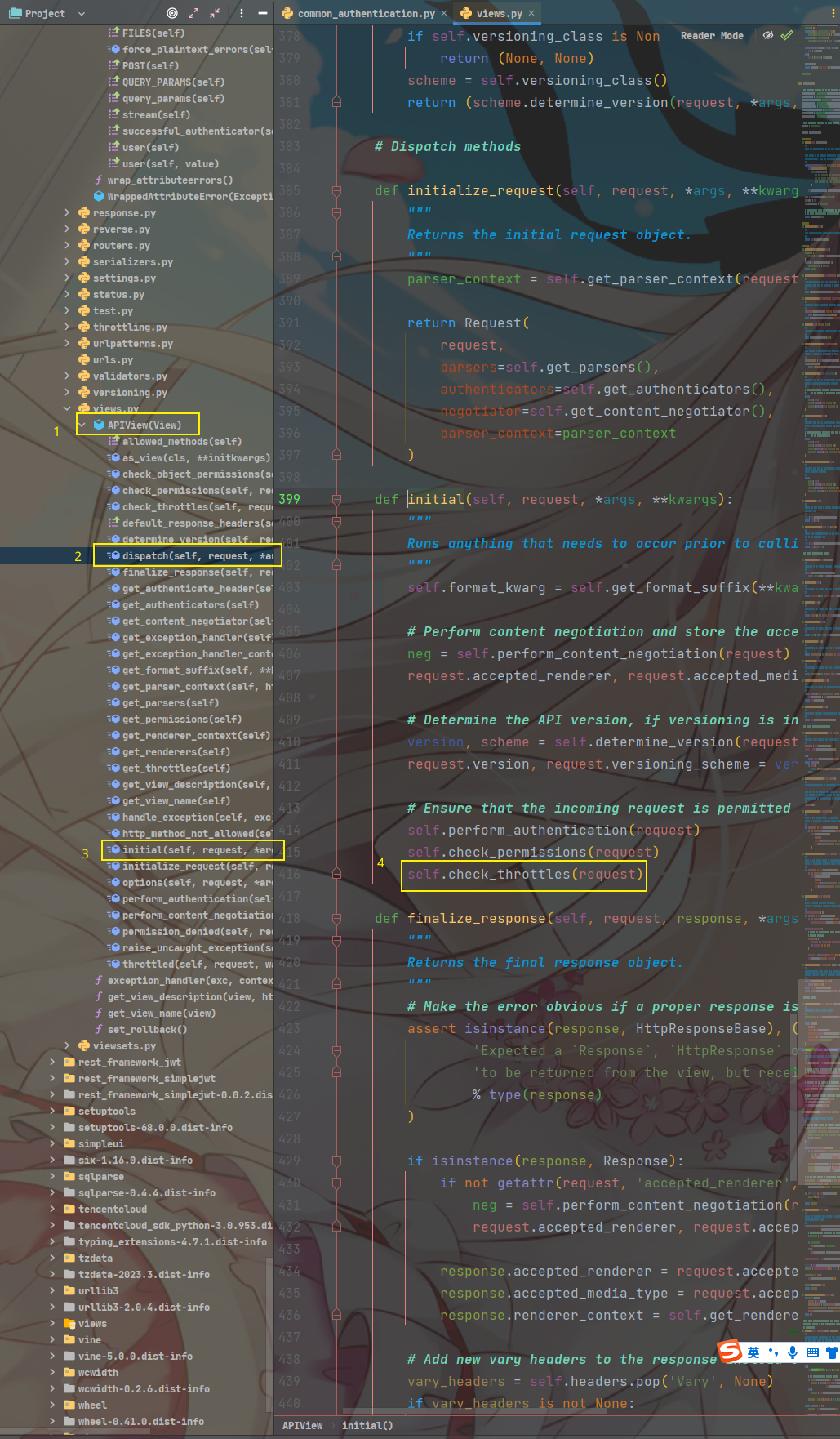
- 如果请求超出了允许的频率限制,将返回一个HTTP 429 Too Many Requests响应。
def check_throttles(self, request): """ Check if request should be throttled. Raises an appropriate exception if the request is throttled. """ # 创建一个空的 throttle_durations 列表,用于存储每个throttle对象返回的限制时间 throttle_durations = [] # 调用 self.get_throttles() 方法获取限制对象列表 # 遍历限制对象列表 for throttle in self.get_throttles(): # 对每个限制对象调用 allow_request(request, self) 方法来检查请求是否允许通过此限制 if not throttle.allow_request(request, self): # 如果请求不允许通过限制(allow_request方法返回 False) # 则调用 throttle.wait() 方法获取限制的时间间隔,并将其添加到 throttle_durations 列表中。 throttle_durations.append(throttle.wait())
# 如果存在 throttle_durations 列表,则说明请求被至少一个限制所影响 if throttle_durations: # Filter out `None` values which may happen in case of config / rate # changes, see #1438
# 在此列表中过滤掉 None 值(可能出现在配置或速率更改的情况下) durations = [ duration for duration in throttle_durations if duration is not None ]
# 然后找到列表中的最大值作为限制的持续时间 duration = max(durations, default=None) # 调用 self.throttled(request, duration) 方法 # 将请求和限制的持续时间传递给 throttled 方法,从而引发一个表示请求被频次限制的异常。 self.throttled(request, duration)- throttled
def throttled(self, request, wait): """ If request is throttled, determine what kind of exception to raise. """ # 抛出异常 raise exceptions.Throttled(wait)【四】内置频率限制类源码分析
【0】BaseThrottle
from rest_framework.throttling import BaseThrottleclass BaseThrottle: """ Rate throttling of requests. """
# 用于确定是否应该允许请求。 # 当请求到达API视图时,DRF会调用这个方法,传递request和view参数。 # 在自定义频率组件需要在这个方法中实现请求的频率控制逻辑。 # 如果允许请求,返回True;如果不允许请求,返回False。 def allow_request(self, request, view): """ Return `True` if the request should be allowed, `False` otherwise. """ raise NotImplementedError('.allow_request() must be overridden')
# 用于识别发出请求的客户端机器,目的是确定请求的来源 def get_ident(self, request): """ Identify the machine making the request by parsing HTTP_X_FORWARDED_FOR if present and number of proxies is > 0. If not use all of HTTP_X_FORWARDED_FOR if it is available, if not use REMOTE_ADDR. """ # 从HTTP_X_FORWARDED_FOR头部获取客户端IP地址 xff = request.META.get('HTTP_X_FORWARDED_FOR') # 获取请求地址IP remote_addr = request.META.get('REMOTE_ADDR') num_proxies = api_settings.NUM_PROXIES
# 如果存在代理服务器且NUM_PROXIES设置大于0 if num_proxies is not None: # 如果不存在代理服务器或者NUM_PROXIES设置为0 if num_proxies == 0 or xff is None: # 返回REMOTE_ADDR中的IP地址 return remote_addr
addrs = xff.split(',') client_addr = addrs[-min(num_proxies, len(addrs))] return client_addr.strip()
# 提取最后一个代理服务器的IP地址 return ''.join(xff.split()) if xff else remote_addr
# 返回一个建议的等待时间(以秒为单位),在下一个请求之前应该等待多长时间。 # 如果你的频率组件希望为某些请求推荐等待时间,可以在这个方法中实现。 # 否则,可以返回None。 def wait(self): """ Optionally, return a recommended number of seconds to wait before the next request. """ return None【1】AnonRateThrottle
from rest_framework.throttling import AnonRateThrottleclass AnonRateThrottle(SimpleRateThrottle): """ Limits the rate of API calls that may be made by a anonymous users.
The IP address of the request will be used as the unique cache key. """ scope = 'anon' # 获取到配置文件中配置的 频次 def get_cache_key(self, request, view): # 用户存在 且 是已经认证过的用户 if request.user and request.user.is_authenticated: # 不做处理 return None # Only throttle unauthenticated requests.
# 将 scope 和 ident 插入到缓存键格式中,生成最终的缓存键 return self.cache_format % { 'scope': self.scope, 'ident': self.get_ident(request) }【2】UserRateThrottle
from rest_framework.throttling import UserRateThrottleclass UserRateThrottle(SimpleRateThrottle): """ Limits the rate of API calls that may be made by a given user.
The user id will be used as a unique cache key if the user is authenticated. For anonymous requests, the IP address of the request will be used. """ # 配置文件中的频次限制键 scope = 'user'
# 获取到频率配置 def get_cache_key(self, request, view): # 用户存在 且 是已经认证过的用户 if request.user and request.user.is_authenticated: # 返回用户的ID ident = request.user.pk else: # 默认使用请求地址IP进行限制 ident = self.get_ident(request)
# 将 scope 和 ident 插入到缓存键格式中,生成最终的缓存键 return self.cache_format % { 'scope': self.scope, 'ident': ident }【3】SimpleRateThrottle
from rest_framework.throttling import SimpleRateThrottleclass SimpleRateThrottle(BaseThrottle): """ A simple cache implementation, that only requires `.get_cache_key()` to be overridden.
The rate (requests / seconds) is set by a `rate` attribute on the Throttle class. The attribute is a string of the form 'number_of_requests/period'.
Period should be one of: ('s', 'sec', 'm', 'min', 'h', 'hour', 'd', 'day')
Previous request information used for throttling is stored in the cache. """
# 这是用于存储频率限制信息的缓存,通常是Django中的缓存设置。 # 默认情况下,它使用了default_cache,但你可以根据需要更改为其他缓存。 cache = default_cache
# timer 属性:用于获取当前时间的函数,默认是time.time,用于计算请求的时间间隔。 timer = time.time
# 缓存键的格式,其中的 %(scope)s 和 %(ident)s 将在生成缓存键时替换为相应的值。 cache_format = 'throttle_%(scope)s_%(ident)s'
# 用于确定频率限制的作用域。 # 你可以将其设置为特定的作用域,以便为不同的API端点应用不同的频率限制。 # 这里是我们在配置文件中配置的自定义的限制频率字段 scope = None
# 包含默认频率限制的字典。 # 你可以在DRF的设置中配置默认频率限制,然后在频率组件中使用scope来引用这些默认限制。 THROTTLE_RATES = api_settings.DEFAULT_THROTTLE_RATES
def __init__(self):
# 解析 rate 属性,该属性是频率限制的字符串表示形式,例如 '5/minute' if not getattr(self, 'rate', None): # 获取限制条件 self.rate = self.get_rate()
# 获取到限制时间,获取到限制时间单位 self.num_requests, self.duration = self.parse_rate(self.rate)
# 该方法用于生成唯一的缓存键,以便为请求进行频率限制。 # 自定义频率组件中实现这个方法,以根据请求的属性和视图信息生成缓存键。 def get_cache_key(self, request, view): """ Should return a unique cache-key which can be used for throttling. Must be overridden.
May return `None` if the request should not be throttled. """ # raise NotImplementedError('.get_cache_key() must be overridden')
# 校验并返回是否存在频率限制关键字 def get_rate(self): """ Determine the string representation of the allowed request rate. """ # 从请求对象本身校验是否存在 scope 限制频率关键字 if not getattr(self, 'scope', None): # 没有则抛出异常,必须定义限制条件 msg = ("You must set either `.scope` or `.rate` for '%s' throttle" % self.__class__.__name__) # 抛出异常 raise ImproperlyConfigured(msg)
try: # 返回默认的限制频率条件 return self.THROTTLE_RATES[self.scope] except KeyError: # 没有默认限制频率条件则抛出异常 msg = "No default throttle rate set for '%s' scope" % self.scope raise ImproperlyConfigured(msg)
# 解析频率限制字符串,返回允许的请求数和时间间隔 def parse_rate(self, rate): """ Given the request rate string, return a two tuple of: <allowed number of requests>, <period of time in seconds> """ # 判断是否存在限制条件 if rate is None: # 不存在则返回None return (None, None)
# 按照 / 切割限制条件 , 这就是上面我们定义 5/minute 格式的原因 num, period = rate.split('/')
# 转换我们的到的前面的数字 num_requests = int(num)
# minute 只拿第一个字母 # second : s 秒 # minute : m 分 # hour : h 时 # day : d 天 duration = {'s': 1, 'm': 60, 'h': 3600, 'd': 86400}[period[0]] # 将限制条件返回 return (num_requests, duration)
# 检查是否应该允许请求 def allow_request(self, request, view): """ Implement the check to see if the request should be throttled.
On success calls `throttle_success`. On failure calls `throttle_failure`. """ # 判断当前是够存在频率限速 if self.rate is None: # 不存在则返回True,继续执行视图函数,不对视图函数做限制 return True
# 获取到缓存的键 self.key = self.get_cache_key(request, view) # 判断键是否存在 if self.key is None: return True
# 判断是否存在历史限速 self.history = self.cache.get(self.key, [])
# 获取当前时间 self.now = self.timer()
# Drop any requests from the history which have now passed the # throttle duration
# 如果历史时间存在 并 且 最后一次访问时间 小于等于 当前时间 - 限速时间 while self.history and self.history[-1] <= self.now - self.duration: # 将当前时间从历史时间中删除记录 self.history.pop()
# 如果历史记录里面的长度 大于等于 当前请求时间 if len(self.history) >= self.num_requests:
# 返回限制存在,拦截请求 return self.throttle_failure()
# 否则正常通过不做限制 return self.throttle_success()
# 在请求通过频率限制时调用,它将当前请求的时间戳插入到缓存中。 def throttle_success(self): """ Inserts the current request's timestamp along with the key into the cache. """ # 将当前时间插入到历史事件记录内 self.history.insert(0, self.now) # 更新缓存中的限制关键字,历史记录,和限制时间单位 self.cache.set(self.key, self.history, self.duration) return True
# 在请求由于频率限制而失败时调用,你可以在这里定义失败时的行为。 def throttle_failure(self): """ Called when a request to the API has failed due to throttling. """ return False
# 返回建议的下一个请求时间间隔(以秒为单位),用于告诉客户端何时可以重试请求。 def wait(self): """ Returns the recommended next request time in seconds. """
# 如果请求历史记录 self.history 存在(表示之前有请求被记录) if self.history: # 首先计算剩余的持续时间 remaining_duration。 # 这个剩余的持续时间表示离下一个请求窗口还有多少秒。 remaining_duration = self.duration - (self.now - self.history[-1]) else: # 如果请求历史记录不存在(即没有之前的请求被记录) # remaining_duration 设置为频率限制的持续时间 self.duration。 remaining_duration = self.duration
# 计算可用的请求数 available_requests,这是当前请求窗口内可用的请求数 # 总请求数 self.num_requests 减去 已记录的请求数量len(self.history) 并加上1来计算的 # 加1是为了包括当前请求 available_requests = self.num_requests - len(self.history) + 1
# 如果可用的请求数小于等于0(表示请求已经超过了频率限制),则返回 None if available_requests <= 0: return None
# 否则返回建议的等待时间,即 remaining_duration 除以 可用的请求数 available_requests。 return remaining_duration / float(available_requests)【4】ScopedRateThrottle
from rest_framework.throttling import ScopedRateThrottleclass ScopedRateThrottle(SimpleRateThrottle): """ Limits the rate of API calls by different amounts for various parts of the API. Any view that has the `throttle_scope` property set will be throttled. The unique cache key will be generated by concatenating the user id of the request, and the scope of the view being accessed. """
# 该属性定义了视图中用于确定频率限制作用域的属性名称,默认为 'throttle_scope'。 # 这意味着在视图中,你可以通过设置 throttle_scope 属性来指定频率限制作用域。 scope_attr = 'throttle_scope'
def __init__(self): # 在初始化时,它覆盖了通常的 SimpleRateThrottle 初始化,因为在初始化时无法确定频率限制,而需要在视图被调用时才能确定。 # Override the usual SimpleRateThrottle, because we can't determine # the rate until called by the view. pass
# 这个方法允许请求,但在请求被处理之前,它需要确定请求的频率限制作用域 def allow_request(self, request, view): # We can only determine the scope once we're called by the view.
# 首先检查视图是否有 throttle_scope 属性,如果没有,就直接允许请求 self.scope = getattr(view, self.scope_attr, None)
# If a view does not have a `throttle_scope` always allow the request
# 如果视图有 throttle_scope 属性,它会根据作用域来确定频率限制 if not self.scope: return True
# Determine the allowed request rate as we normally would during # the `__init__` call.
# 获取到频率限制字段 self.rate = self.get_rate() # 获取频率限制时间和单位 self.num_requests, self.duration = self.parse_rate(self.rate)
# 继续调用 super().allow_request(request, view) 来执行实际的频率限制检查 return super().allow_request(request, view)
# 重写了获取缓存关键字的方法,生成唯一的缓存键,以便为请求进行频率限制 def get_cache_key(self, request, view): """ If `view.throttle_scope` is not set, don't apply this throttle.
Otherwise generate the unique cache key by concatenating the user id with the `.throttle_scope` property of the view. """ # 检查用户是否已经认证 if request.user and request.user.is_authenticated: # 如果是,将用户的主键作为标识符 ident = request.user.pk else: # 如果未认证,将使用 get_ident 方法获取请求的标识符 ident = self.get_ident(request)
# 将 scope 和 ident 插入到缓存键格式中,生成最终的缓存键 return self.cache_format % { 'scope': self.scope, 'ident': ident }【五】频率类的一般使用步骤(固定用法)
【1】创建自定义频次认证类
- 首先,需要创建一个频次认证类,并让它继承自
SimpleRateThrottle - 这个类负责限制对某些操作或资源的访问频次。
【2】重写 get_cache_key 方法
-
在创建频次认证类后,需要重写其中的
get_cache_key方法。 -
这个方法决定了如何从请求中获取缓存键值,以便在缓存中存储和检索频次信息。
-
可以考虑使用以下信息作为缓存键值的组成部分:
-
用户身份:可以使用用户的唯一标识符或者请求中的某些认证信息。
-
资源标识:如果需要对不同的资源进行频次限制,可以加入资源标识。
-
操作类型:如果需要对不同的操作类型进行频次限制,可以加入操作类型。
-
-
根据具体情况,可以将这些信息组合起来构成一个唯一的缓存键值,并在
get_cache_key方法中返回。 -
最后,在频次认证类中,可以添加一个类属性来自定义命名。
-
这个属性可以用于在缓存中存储频次信息时使用。
-
可以考虑使用以下方式定义类属性:
- 在使用时,可以通过
MyThrottle.cache_name来访问这个自定义属性。
- 在使用时,可以通过
from rest_framework.throttling import SimpleRateThrottle
class SimpleRate_Throttle(SimpleRateThrottle): # 自定义限制频次关键字,在配置文件中需要以这个关键字限制频率 scope = "scope_throttle"
# 重写 get_cache_key 方法 # 返回什么就用什么作为限制条件 def get_cache_key(self, request, view): # 限制条件:IP地址/用户ID # 返回客户端IP地址 return request.META.get('REMOTE_ADDR')
# 选择性重写 -- 这里是伪代码 def wait(self): """ Returns the recommended next request time in seconds. """ if self.history: remaining_duration = self.duration - (self.now - self.history[-1]) else: remaining_duration = self.duration
available_requests = self.num_requests - len(self.history) + 1 if available_requests <= 0: return None
# 自定义频率限制的等待时间计算 # 例如,你可以根据客户端IP来调整等待时间,更频繁的IP等待时间短一些 ip = self.get_cache_key(self.request, self.view) if ip == "特定IP地址": # 对于特定IP,可以设置更短的等待时间 return remaining_duration / float(available_requests) * 0.5 else: # 对于其他IP,使用默认等待时间 return remaining_duration / float(available_requests)【3】配置文件中配置
- 配置文件中需要对频次认证类进行相关配置
- 具体配置内容包括认证类的名称、参数设置和限制的频次等信息。
- 这里的限制关键字的变量名要和上面自定义限制类中的变量名一致
- 例如,在Django框架中,可以在settings.py或其他相关的配置文件中添加如下内容
- ‘myapp.apithrottling.SimpleRate_Throttle’ 是频次认证类的名称
- scope_throttle 是前述创建的频次认证类的类属性自定义命名
REST_FRAMEWORK = { 'DEFAULT_THROTTLE_CLASSES': ( # 自己的频率限制类的位置 --- 全局生效 'myapp.apithrottling.SimpleRate_Throttle', ), 'DEFAULT_THROTTLE_RATES': { 'scope_throttle': '5/minute', # 设置该频次认证类的限制频次为每分钟最多5次请求 }}【4】局部使用
- 注意,只有继承了APIView 及其 子类的视图才会走三大认证
from rest_framework.decorators import throttle_classes
# @throttle_classes([MyThrottle]) 方式一:作为类的装饰器使用class BookView(APIView): # 方式二:在视图类中应用限制类 throttle_classes = [SimpleRate_Throttle]【5】全局使用,局部禁用
class BookView(APIView):
# 将频率限制类的限制类列表清空即可 throttle_classes = []支持与分享
如果这篇文章对你有帮助,欢迎分享给更多人或打赏支持!
评论区
