


Linux 进程管理:ps、kill、pstree 与作业控制
- 1Linux 系统概述:历史、发行版与 Ubuntu
- 2Linux引入
- 3Ubuntu Linux 安装:镜像、虚拟机与初始化
- 4Linux之系统服务
- 5Shell 基础:命令行与常用命令
- 6Linux之进程管理
- 7Vim 编辑器:模式、编辑与配置
- 8Linux之计划任务
- 9Linux 环境变量:作用域、配置与生效
- 10Linux初识
- 11Linux 软件包管理:RPM、DEB 与 APT
- 12Linux之网络
- 13Linux 用户与权限基础
- 14Linux之Shell
- 15Linux 文件管理:目录、文件类型、权限与常用操作
- 16Linux之文件管理
- 17Linux 磁盘管理:分区、格式化、挂载与空间查看
- 18Linux之用户管理
- 19Linux 进程管理:ps、kill、pstree 与作业控制本文
- 20Linux之基本权限
- 21Linux 网络管理:接口、路由、连通性与 NetworkManager
- 22Linux之特殊权限
- 23Linux 时间管理:date、hwclock、timedatectl 与时区
- 24Linux之软件管理
- 25Linux 系统服务管理:SysV init 与 systemd
- 26修改Linux登录时提示信息
- 27Shell 编程:变量、流程控制、函数与脚本
- 28【VIM编辑功能总结】
- 29Makefile 与 CMake:构建自动化基础
- 30简洁好用的Linux运维管理面板
- 31Linux 常用服务搭建:TFTP、NFS、Samba 与 SSH
- 32Linux 安装 fd , 替代 find 命令
- 33Linux知识点总结
【一】进程的理解与分类
进程是一个独立的可调度的任务
进程是一个程序的一次执行的过程
【1】进程和程序的区别
程序是静态的,它是一些保存在磁盘上的指令的有序集合,没有任何执行的概念 进程是一个动态的概念,它是程序执行的过程,包括创建、调度和消亡
进程是资源分配和隔离的基本单位;Linux 调度器实际调度的是线程(任务),一个进程可以包含多个线程。
【2】进程的分类
交互进程:该类进程是由shell控制和运行的。交互进程既可以在前台运行,也可以在后台运行。
批处理进程:该类进程不属于某个终端,它被提交到一个队列中以便顺序执行。
守护进程:该类进程在后台运行。它一般在Linux启动时开始执行,系统关闭时才结束。
【3】主要的进程标识
进程号(Process ID,PID)在系统当前运行期间标识一个进程。进程退出后 PID 可以被复用,因此不能将旧 PID 长期保存后直接用于 kill。
父进程号(Parent Process ID,PPID)
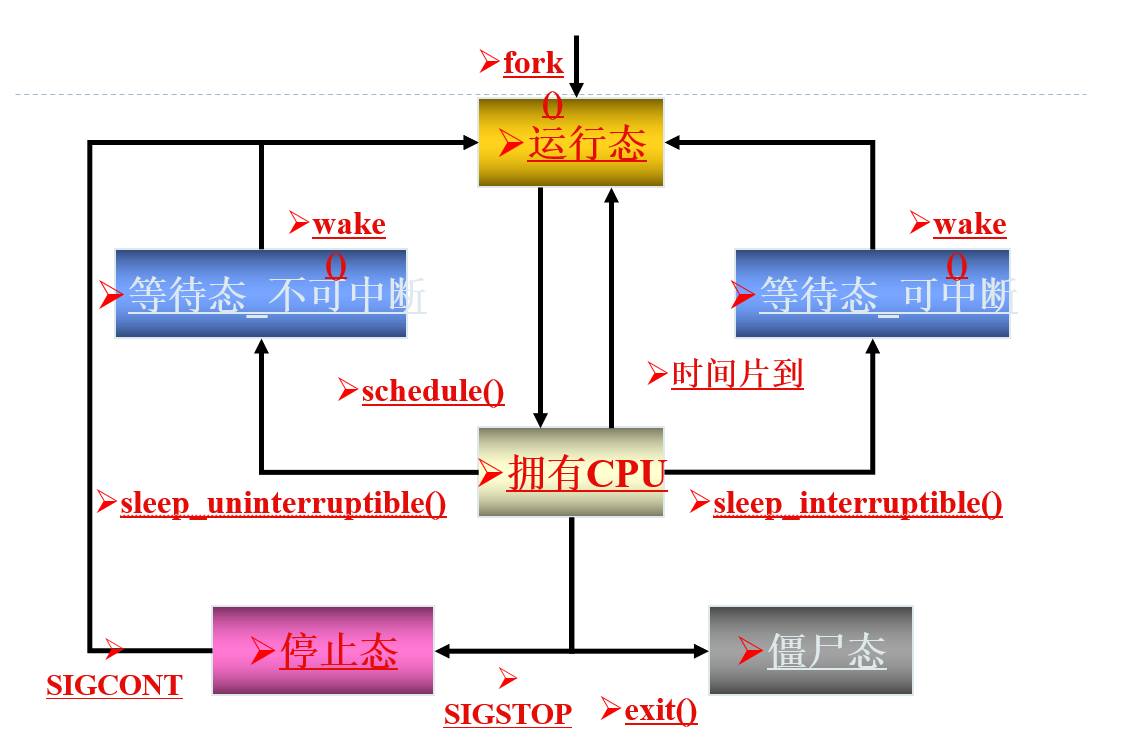
【4】进程的状态
运行态:此时进程或者正在运行,或者准备运行。
等待态(挂起):此时进程在等待一个事件的发生或某种系统资源。
- 可中断
- 不可中断
停止态:此时进程被中止。
死亡态:这是一个已终止的进程,但还在进程向量数组中占有一个task_struct结构。
【二】进程管理命令
【1】ps 查看进程命令
ps命令来自于英文词组”process status“的缩写,其功能是用于显示当前系统的进程状态。
使用ps命令可以查看到进程的所有信息,例如进程的号码、发起者、系统资源使用占比(处理器与内存)、运行状态等等。
经常会与kill命令搭配使用来中断和删除不必要的服务进程,避免服务器的资源浪费。
语法格式:ps [参数]
常用参数:
a 显示现行终端机下的所有程序,包括其他用户的程序
u 以用户为主的格式来显示程序状况
x 显示所有程序,不以终端机来区分
e 列出程序时,显示每个程序所使用的环境变量
-e 选择所有进程,与不带连字符的 e 含义不同。
-f 显示UID,PPIP,C与STIME栏位
常用命令
ps aux # 显示进程ps -ef # 查看进程, 显示pid ppid# 查找进程(ps | grep 会匹配到 grep 自身,因此使用字符类避免它出现)pgrep -a sogoups -ef | grep '[s]ogou'# 确认 PID 与命令行后,再发送默认的 SIGTERMkill <PID>(1)显示进程ps aux
ps aux # 显示进程# USER : 进程的所有者, 哪个用户运行的进程# PID : 进程号;PID 1 是系统的初始化进程(常见为 systemd)# %CPU : 占用cpu的百分比# %MEM : 占用内存的百分比# VSZ : 虚拟内存的大小# RSS : 常驻内存集(Resident Set Size),表示该进程分配的内存大小# TTY : 所属的终端# STAT : 进程的状态# START: 启动时间# TIME : Time是该进程所占用的处理器时间# COMMAND : 执行的程序linux@ubuntu:~/work$ ps auxUSER PID %CPU %MEM VSZ RSS TTY STAT START TIME COMMANDroot 1 0.0 0.3 225488 7616 ? Ss 8月24 0:06 /sbin/init auto nopromptroot 2 0.0 0.0 0 0 ? S 8月24 0:00 [kthreadd]root 3 0.0 0.0 0 0 ? I< 8月24 0:00 [rcu_gp]root 4 0.0 0.0 0 0 ? I< 8月24 0:00 [rcu_par_gp]root 6 0.0 0.0 0 0 ? I< 8月24 0:00 [kworker/0:0H-kb]root 9 0.0 0.0 0 0 ? I< 8月24 0:00 [mm_percpu_wq]root 10 0.0 0.0 0 0 ? S 8月24 0:00 [ksoftirqd/0]root 11 0.0 0.0 0 0 ? I 8月24 0:06 [rcu_sched]root 12 0.0 0.0 0 0 ? S 8月24 0:00 [migration/0]root 13 0.0 0.0 0 0 ? S 8月24 0:00 [idle_inject/0]root 14 0.0 0.0 0 0 ? S 8月24 0:00 [cpuhp/0]root 15 0.0 0.0 0 0 ? S 8月24 0:00 [cpuhp/1]root 16 0.0 0.0 0 0 ? S 8月24 0:00 [idle_inject/1]linux 1420 0.0 0.3 356328 6828 tty1 Sl 8月24 0:00 ibus-daemon --xim --panel disablelinux 1424 0.0 0.2 275628 5744 tty1 Sl 8月24 0:00 /usr/lib/ibus/ibus-dconflinux 1426 0.0 0.7 339336 14868 tty1 Sl 8月24 0:00 /usr/lib/ibus/ibus-x11 --kill-daemonlinux 1429 0.0 0.2 273568 5116 ? Sl 8月24 0:00 /usr/lib/ibus/ibus-portallinux 1436 0.0 0.2 266436 4888 ? Ssl 8月24 0:00 /usr/libexec/xdg-permission-storelinux 1443 0.0 0.5 689896 10860 ? Sl 8月24 0:00 /usr/lib/gnome-shell/gnome-slinux 1447 0.0 0.6 1367104 13536 ? Ssl 8月24 0:00 /usr/lib/evolution/evolutionlinux 1455 0.0 0.7 785840 14508 ? Sl 8月24 0:00 /usr/lib/gnome-online-accounts(2)查看进程ps -ef
# ps -ef# UID : 用户名# PID : 进程号# PPID : 父进程号# TTY : 终端# STIME : Stime指进程启动时间# TIME : Time是该进程所占用的处理器时间# CMD : 执行的程序linux@ubuntu:~/work$ ps -efUID PID PPID C STIME TTY TIME CMDroot 1 0 0 8月24 ? 00:00:07 /sbin/init auto nopromptroot 2 0 0 8月24 ? 00:00:00 [kthreadd]root 3 2 0 8月24 ? 00:00:00 [rcu_gp]root 4 2 0 8月24 ? 00:00:00 [rcu_par_gp]root 6 2 0 8月24 ? 00:00:00 [kworker/0:0H-kb]root 9 2 0 8月24 ? 00:00:00 [mm_percpu_wq]root 10 2 0 8月24 ? 00:00:00 [ksoftirqd/0]root 11 2 0 8月24 ? 00:00:06 [rcu_sched]linux 1762 1144 0 8月24 tty1 00:00:04 /usr/bin/gnome-software --gapplication-servicelinux 1764 1144 0 8月24 tty1 00:00:01 update-notifierlinux 1901 1380 0 8月24 ? 00:00:00 /usr/lib/gvfs/gvfsd-network --spawner :1.24 /org/gtk/linux 1942 1 0 8月24 ? 00:00:17 /opt/sogoupinyin/files/bin/sogoupinyin-watchdoglinux 1949 1 0 8月24 ? 00:00:04 /opt/sogoupinyin/files/bin/sogoupinyin-servicelinux 1964 1380 0 8月24 ? 00:00:00 /usr/lib/gvfs/gvfsd-dnssd --spawner :1.24 /org/gtk/gvf# 精确查找程序运行的进程信息linux@ubuntu:~/work$ ps aux |grep bluetoothdroot 876 0.0 0.1 10488 5120 ? Ss 09:05 0:00 /usr/lib/bluetooth/bluetoothdlinux 3354 0.0 0.0 17888 2560 pts/0 S+ 10:02 0:00 grep --color=auto bluetoothdlinux@ubuntu:~/work$ ps -ef |grep bluetoothdroot 876 1 0 09:05 ? 00:00:00 /usr/lib/bluetooth/bluetoothdlinux 3356 2138 0 10:03 pts/0 00:00:00 grep --color=auto bluetoothd
# 可以使用kill 进程号 可以杀死进程linux@ubuntu:~/work$ ps -ef |grep bluetoothdroot 876 1 0 09:05 ? 00:00:00 /usr/lib/bluetooth/bluetoothdlinux 3360 2138 0 10:03 pts/0 00:00:00 grep --color=auto bluetoothd
linux@ubuntu:~/work$ sudo kill 876[sudo] linux 的密码:linux@ubuntu:~/work$ ps -ef |grep bluetoothdlinux 3369 2138 0 10:03 pts/0 00:00:00 grep --color=auto bluetoothd【2】kill 杀死进程命令
kill命令的功能是用于杀死(结束)进程,与英文单词的含义相同。Linux系统中如需结束某个进程,既可以使用如service或systemctl的管理命令来结束服务,也可以使用kill命令直接结束进程信息。
优先使用默认的 SIGTERM(kill <PID>),让程序有机会清理资源。仅在确认进程无响应且可以承受数据丢失时,才考虑 SIGKILL(kill -KILL <PID>)。SIGKILL 无法被捕获或清理,并不能终止不可中断睡眠(D 状态)的进程。
语法格式:kill [参数] 进程号
常用参数:
-l 列出系统支持的信号
-s 指定向进程发送的信号
-a 不限制命令名和进程号的对应关系
-p 不发送任何信号
参考实例
列出系统支持的全部信号列表:
linux@ubuntu:~/work$ kill -l1) SIGHUP 2) SIGINT 3) SIGQUIT 4) SIGILL 5) SIGTRAP6) SIGABRT 7) SIGBUS 8) SIGFPE 9) SIGKILL 10) SIGUSR111) SIGSEGV 12) SIGUSR2 13) SIGPIPE 14) SIGALRM 15) SIGTERM16) SIGSTKFLT 17) SIGCHLD 18) SIGCONT 19) SIGSTOP 20) SIGTSTP21) SIGTTIN 22) SIGTTOU 23) SIGURG 24) SIGXCPU 25) SIGXFSZ26) SIGVTALRM 27) SIGPROF 28) SIGWINCH 29) SIGIO 30) SIGPWR31) SIGSYS 34) SIGRTMIN 35) SIGRTMIN+1 36) SIGRTMIN+2 37) SIGRTMIN+338) SIGRTMIN+4 39) SIGRTMIN+5 40) SIGRTMIN+6 41) SIGRTMIN+7 42) SIGRTMIN+843) SIGRTMIN+9 44) SIGRTMIN+10 45) SIGRTMIN+11 46) SIGRTMIN+12 47) SIGRTMIN+1348) SIGRTMIN+14 49) SIGRTMIN+15 50) SIGRTMAX-14 51) SIGRTMAX-13 52) SIGRTMAX-1253) SIGRTMAX-11 54) SIGRTMAX-10 55) SIGRTMAX-9 56) SIGRTMAX-8 57) SIGRTMAX-758) SIGRTMAX-6 59) SIGRTMAX-5 60) SIGRTMAX-4 61) SIGRTMAX-3 62) SIGRTMAX-263) SIGRTMAX-1 64) SIGRTMAX常用方法:
# 绝不要执行 kill -9 -1:它会向当前用户有权限操作的多个进程发送 SIGKILL,可能导致会话或系统不可用kill -L # List the available signal choices in a nice table.kill 123 543 2341 3453 # Send the default signal, SIGTERM, to all those processes. 使用默认信号15 去杀死进程kill 123 # 发送默认的 SIGTERM(15),程序可捕获并有序退出kill -KILL 123 # 发送 SIGKILL(9);不可捕获,可能造成数据或临时文件残留linux@ubuntu:~$ ps -ef|grep bluetoothdroot 4602 1 0 10:16 ? 00:00:00 /usr/lib/bluetooth/bluetoothdlinux 5624 5611 0 10:17 pts/0 00:00:00 grep --color=auto bluetoothd
linux@ubuntu:~$ sudo kill -9 4602[sudo] linux 的密码:linux@ubuntu:~$ ps -ef|grep bluetoothdroot 5632 1 4 10:18 ? 00:00:00 /usr/lib/bluetooth/bluetoothdlinux 5635 5611 0 10:18 pts/0 00:00:00 grep --color=auto bluetoothdlinux@ubuntu:~$ sudo kill -9 5632linux@ubuntu:~$ ps -ef|grep bluetoothdroot 5651 1 4 10:18 ? 00:00:00 /usr/lib/bluetooth/bluetoothdlinux 5654 5611 0 10:18 pts/0 00:00:00 grep --color=auto bluetoothd危险操作提示:
kill -9 -1不应作为实验命令。需要结束服务时优先使用sudo systemctl stop <服务>;需要结束单个用户进程时,先用ps或pgrep确认 PID 和命令行。
示例中 bluetoothd 被结束后出现新的 PID,是因为它可能受 systemd 的服务策略管理并被自动重启。管理服务应使用 systemctl stop/restart/status,不要把 kill 当作服务停启的常规方式。
【3】pstree命令
Linux系统中pstree命令的英文全称是“process tree”,即将所有进程以树状图显示,树状图将会以 pid (如果有指定) 或是以 init 这个基本行程为根 (root),如果有指定使用者 id,则树状图会只显示该使用者所拥有的进程。
语法格式: pstree [参数]
常用参数:
-a 显示每个程序的完整指令,包含路径,参数或是常驻服务的标示
pstree 显示所有进程的详细信息
pstree -a 显示所有进程的所有详细信息,遇到相同的进程名可以压缩显示
参考实例
linux@ubuntu:~$ pstreesystemd─┬─ModemManager───2*[{ModemManager}]├─NetworkManager─┬─dhclient│ └─2*[{NetworkManager}]├─VGAuthService├─accounts-daemon───2*[{accounts-daemon}]├─acpid├─avahi-daemon───avahi-daemon├─bluetoothd├─boltd───2*[{boltd}]├─colord───2*[{colord}]├─cron├─cups-browsed───2*[{cups-browsed}]├─cupsd───dbus├─2*[dbus-daemon]├─fcitx───2*[{fcitx}]├─fcitx-dbus-watc├─fwupd───4*[{fwupd}]├─rsyslogd───3*[{rsyslogd}]├─rtkit-daemon───2*[{rtkit-daemon}]├─snapd───13*[{snapd}]├─sogoupinyin-ser───8*[{sogoupinyin-ser}] # 这就是sougou输入法的进程图├─sogoupinyin-wat───4*[{sogoupinyin-wat}]├─systemd─┬─(sd-pam)│ ├─at-spi-bus-laun─┬─dbus-daemon│ │ └─3*[{at-spi-bus-laun}]│ ├─at-spi2-registr───2*[{at-spi2-registr}]│ ├─dbus-daemon│ ├─ibus-portal───2*[{ibus-portal}]│ ├─pulseaudio───3*[{pulseaudio}]│ └─xdg-permission-───2*[{xdg-permission-}]├─systemd─┬─(sd-pam)│ ├─at-spi-bus-laun─┬─dbus-daemon│ │ └─3*[{at-spi-bus-laun}]│ ├─at-spi2-registr───2*[{at-spi2-registr}]│ ├─dbus-daemon│ ├─dconf-service───2*[{dconf-service}]│ ├─evolution-addre─┬─evolution-addre───5*[{evolution-addre}]│ │ └─4*[{evolution-addre}]│ ├─evolution-calen─┬─evolution-calen───8*[{evolution-calen}]│ │ └─4*[{evolution-calen}]│ ├─evolution-sourc───3*[{evolution-sourc}]│ ├─gnome-shell-cal───5*[{gnome-shell-cal}]│ ├─gnome-terminal-─┬─bash───pstree│ │ └─3*[{gnome-terminal-}]│ ├─goa-daemon───3*[{goa-daemon}]│ ├─goa-identity-se───3*[{goa-identity-se}]│ ├─gvfs-afc-volume───3*[{gvfs-afc-volume}]│ ├─gvfs-goa-volume───2*[{gvfs-goa-volume}]│ ├─gvfs-gphoto2-vo───2*[{gvfs-gphoto2-vo}]│ ├─gvfs-mtp-volume───2*[{gvfs-mtp-volume}]│ ├─gvfs-udisks2-vo───2*[{gvfs-udisks2-vo}]│ ├─gvfsd─┬─gvfsd-trash───2*[{gvfsd-trash}]│ │ └─2*[{gvfsd}]│ ├─gvfsd-fuse───5*[{gvfsd-fuse}]│ ├─ibus-portal───2*[{ibus-portal}]│ └─xdg-permission-───2*[{xdg-permission-}]├─systemd-journal├─systemd-logind├─systemd-resolve├─systemd-timesyn───{systemd-timesyn}├─systemd-udevd├─udisksd───4*[{udisksd}]├─unattended-upgr───{unattended-upgr}├─upowerd───2*[{upowerd}]├─vmtoolsd───2*[{vmtoolsd}]├─vmtoolsd───3*[{vmtoolsd}]├─vmware-vmblock-───2*[{vmware-vmblock-}]├─whoopsie───2*[{whoopsie}]└─wpa_supplicant
linux@ubuntu:~$ pstree -a #显示所有进程的所有详细信息,遇到相同的进程名可以压缩显示systemd auto noprompt├─ModemManager --filter-policy=strict│ └─2*[{ModemManager}]├─NetworkManager --no-daemon│ ├─dhclient -d -q -sf /usr/lib/NetworkManager/nm-dhcp-helper -pf /run/dhclient-ens33.pid -lf...│ └─2*[{NetworkManager}]├─VGAuthService├─accounts-daemon│ └─2*[{accounts-daemon}]├─acpid├─avahi-daemon│ └─avahi-daemon├─bluetoothd├─boltd│ └─2*[{boltd}]├─colord│ └─2*[{colord}]├─cron -f├─cups-browsed│ └─2*[{cups-browsed}]├─cupsd -l│ └─dbus dbus://├─gnome-keyring-d --daemonize --login│ └─3*[{gnome-keyring-d}]├─gsd-printer│ └─2*[{gsd-printer}]├─ibus-x11 --kill-daemon│ └─2*[{ibus-x11}]├─ibus-x11 --kill-daemon│ └─2*[{ibus-x11}]├─irqbalance --foreground│ └─{irqbalance}├─kerneloops --test├─kerneloops├─networkd-dispat /usr/bin/networkd-dispatcher --run-startup-triggers│ └─{networkd-dispat}├─packagekitd│ └─2*[{packagekitd}]├─polkitd --no-debug│ └─2*[{polkitd}]├─pulseaudio --start --log-target=syslog│ └─3*[{pulseaudio}]├─rsyslogd -n│ └─3*[{rsyslogd}]├─rtkit-daemon│ └─2*[{rtkit-daemon}]├─snapd│ └─13*[{snapd}]├─sogoupinyin-ser│ └─8*[{sogoupinyin-ser}]├─sogoupinyin-wat│ └─4*[{sogoupinyin-wat}]├─systemd --user│ ├─(sd-pam)│ ├─at-spi-bus-laun│ │ ├─dbus-daemon --config-file=/usr/share/defaults/at-spi2/accessibility.conf│ │ └─3*[{at-spi-bus-laun}]│ ├─at-spi2-registr --use-gnome-session│ │ └─2*[{at-spi2-registr}]│ ├─dbus-daemon --session --address=systemd: --nofork --nopidfile --systemd-activation --syslog-only│ ├─ibus-portal│ │ └─2*[{ibus-portal}]│ ├─pulseaudio --daemonize=no│ │ └─3*[{pulseaudio}]│ └─xdg-permission-│ └─2*[{xdg-permission-}]├─systemd-udevd├─udisksd│ └─4*[{udisksd}]├─unattended-upgr /usr/share/unattended-upgrades/unattended-upgrade-shutdown --wait-for-signal│ └─{unattended-upgr}├─upowerd│ └─2*[{upowerd}]├─vmtoolsd│ └─2*[{vmtoolsd}]├─vmtoolsd -n vmusr --blockFd 3│ └─3*[{vmtoolsd}]├─vmware-vmblock- /run/vmblock-fuse -o rw,subtype=vmware-vmblock,default_permissions,│ └─2*[{vmware-vmblock-}]├─whoopsie -f│ └─2*[{whoopsie}]└─wpa_supplicant -u -s -O /run/wpa_supplicant【4】top 任务管理器命令
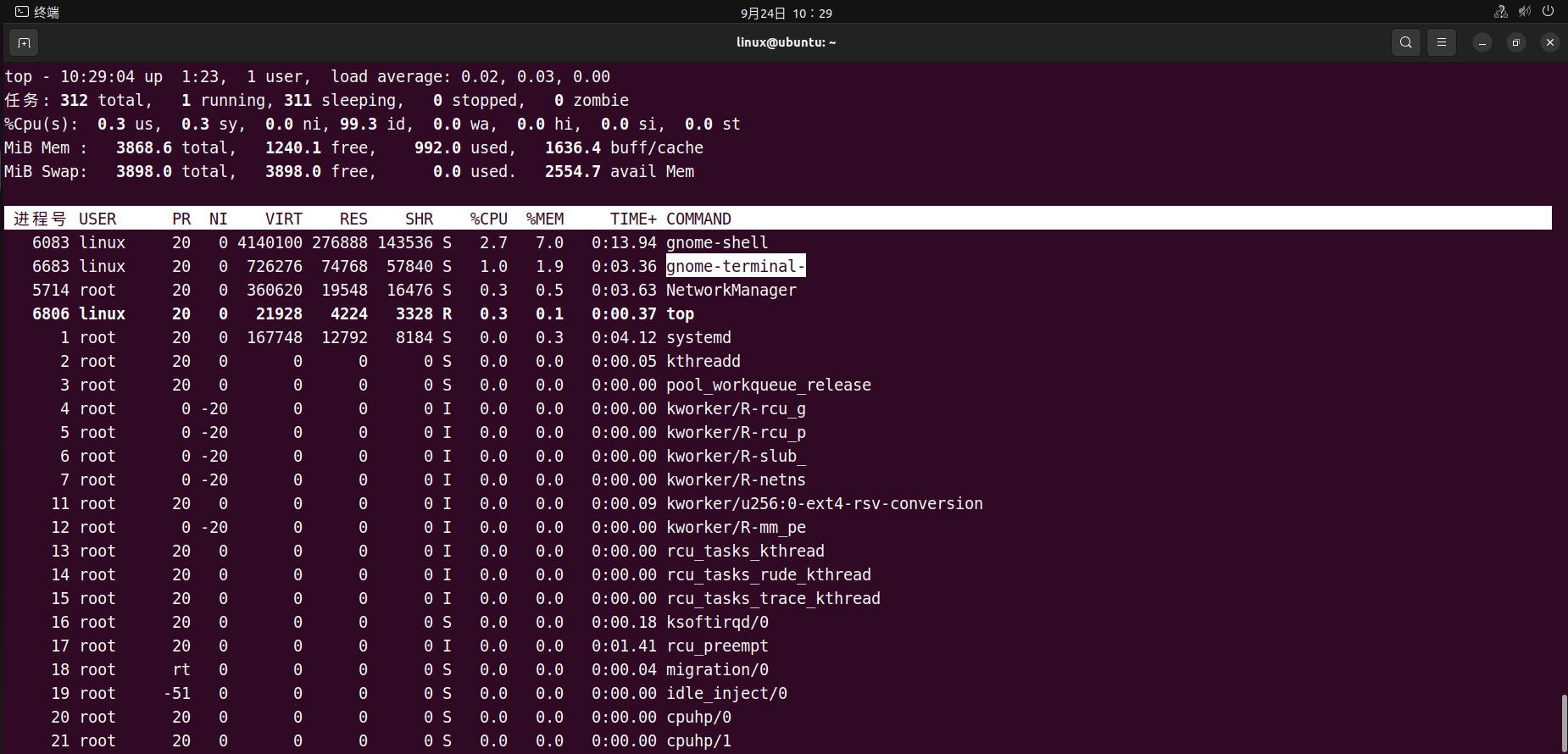
top命令的功能是用于实时显示系统运行状态,包含处理器、内存、服务、进程等重要资源信息。工程师们常常会把top命令比作是“加强版 的Windows任务管理器”,因为除了能看到常规的服务进程信息以外,还能够对处理器和内存的负载情况一目了然,实时感知系统全局的 运行状态,非常适合作为接手服务器后执行的第一条命令。
退出top时, 使用q 进行退出。
语法格式:top [参数]
常用参数:
-d <秒> 改变显示的更新速度
-c 切换显示模式
-s 安全模式,不允许交互式指令
-i 不显示任何闲置或僵死的行程
-n 设定显示的总次数,完成后将会自动退出
-b 批处理模式,不进行交互式显示
例如:
【5】fg 切换到前台
fg 将当前 Shell 管理的后台或已停止作业切回前台。它操作的是 job(作业号),不是任意 PID;可先用 jobs -l 查看,若只有一个作业可省略作业号。
语法格式:fg [参数]
参考实例
test_fg.c实现
#include <stdio.h>#include <unistd.h>int main(int argc, char const *argv[]){while(1){sleep(1);}return 0;}例如
linux@ubuntu:~/work$ gcc test_fg.c -o test_fglinux@ubuntu:~/work$ ./test_fg & # 可以把当前正运行的进程放到后台去执行[2] 2513
linux@ubuntu:~/work$ ps -ef|grep test_fglinux 2502 2093 0 14:31 pts/0 00:00:00 ./test_fglinux 2513 2093 0 14:31 pts/0 00:00:00 ./test_fglinux 2517 2093 0 14:32 pts/0 00:00:00 grep --color=auto test_fg
linux@ubuntu:~/work$ kill 2502 2513linux@ubuntu:~/work$ ps -ef|grep test_fglinux 2519 2093 0 14:32 pts/0 00:00:00 grep --color=auto test_fg[1]- 已终止 ./test_fg[2]+ 已终止 ./test_fg
linux@ubuntu:~/work$ ps -ef|grep test_fglinux 2521 2093 0 14:32 pts/0 00:00:00 grep --color=auto test_fglinux@ubuntu:~/work$ ./test_fg &[1] 2522 # [1] 表示任务的编号linux@ubuntu:~/work$ fg 2522 # 这里不能使用pid , 只能有任务编号 [1]里面的数字bash: fg: 2522: 无此任务linux@ubuntu:~/work$ fg %1 # %1 是任务编号,把任务 1 切换到前台./test_fg^Z[1]+ 已停止 ./test_fg # 把这个任务切换到后台并停止运行【6】bg 切换到后台命令
bg 将当前 Shell 中处于停止状态的作业恢复并放到后台运行。command & 是启动时就放入后台;两者都属于 Shell 作业控制,终端关闭后作业是否继续运行取决于 SIGHUP、nohup、tmux 等因素。
语法格式:bg [参数]
参考实例
linux@ubuntu:~/work$ ps -ef|grep test_fglinux 2532 2093 0 14:39 pts/0 00:00:00 grep --color=auto test_fglinux@ubuntu:~/work$ ./test_fg # 在前台运行这个程序^Z[1]+ 已停止 ./test_fg # 使用ctrl +z 把进程切换到后台并停止linux@ubuntu:~/work$ bg 1 # 在使用 bg 1 把这个程序运行起来[1]+ ./test_fg &linux@ubuntu:~/work$ fg 1 # 把1 任务切换到前台./test_fg^Z[1]+ 已停止 ./test_fg # ctrl +z 把任务暂停linux@ubuntu:~/work$ bg 1[1]+ ./test_fg &linux@ubuntu:~/work$ ls1.1_1.2.patch 1.1.c test_fg test_fg.clinux@ubuntu:~/work$ fg 1./test_fg^C【补充】验证与故障排查
先用 ps -p PID -o pid,ppid,stat,cmd 核对目标进程,再发送信号;默认 SIGTERM 允许程序清理退出,SIGKILL 仅用于无法正常退出的情况。jobs 只显示当前 Shell 的作业,系统服务应使用对应服务管理器控制。
参考资料
支持与分享
如果这篇文章对你有帮助,欢迎分享给更多人或打赏支持!
评论区
